MooneyCheck - Software
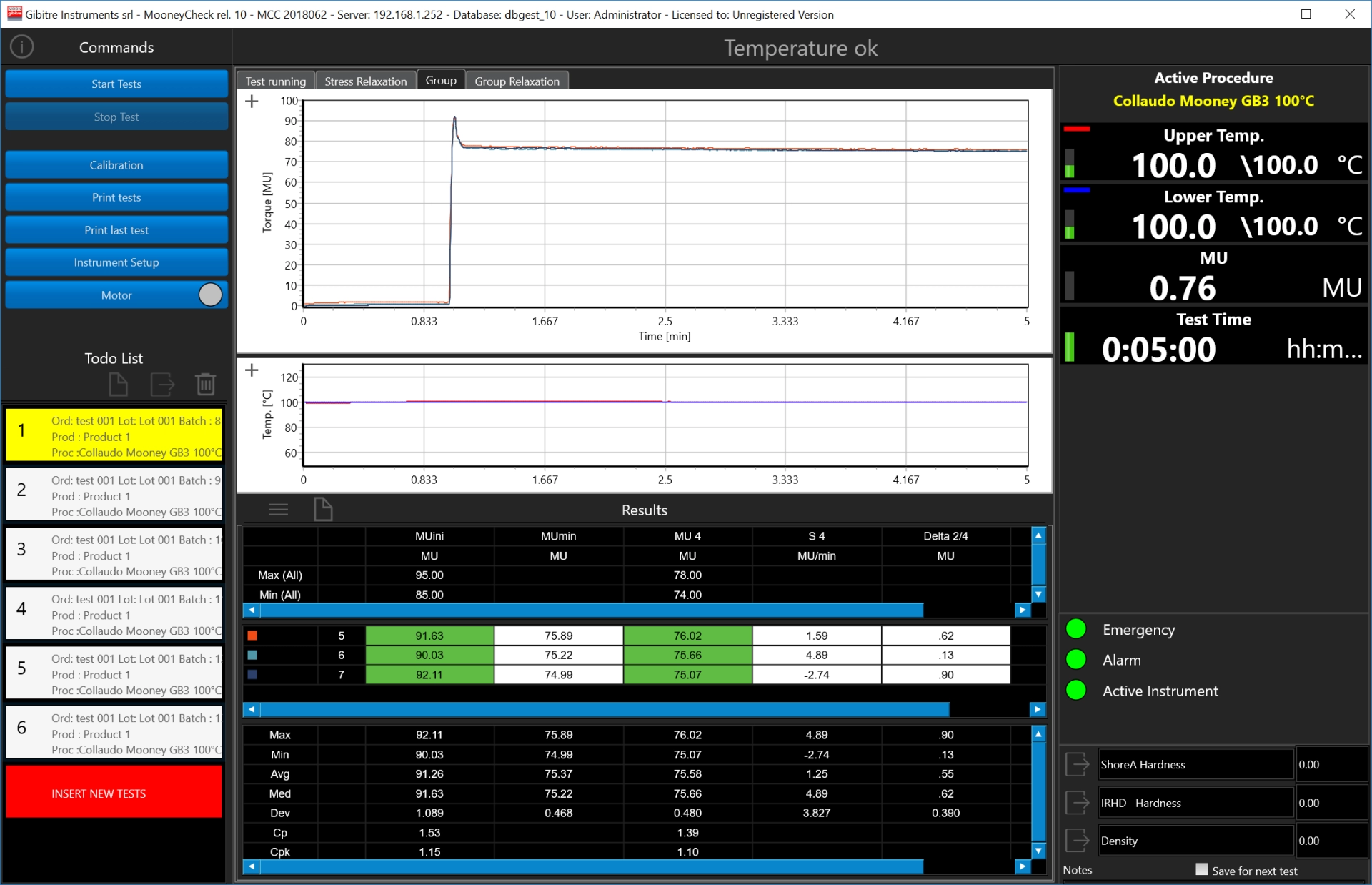
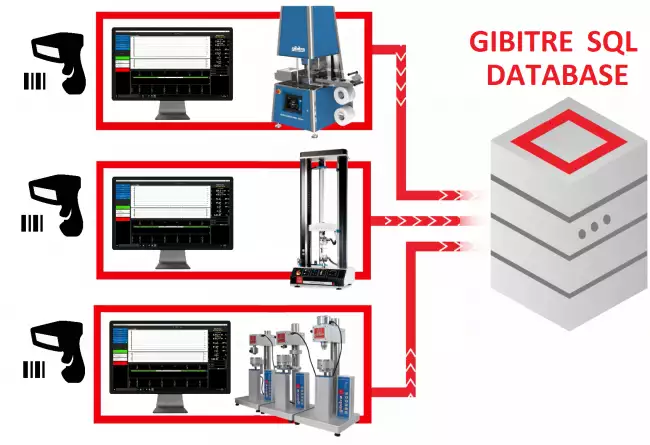
The new Release 10 of the program optimizes the identification of the tests, the management of the instrument and stores the Results in the Gibitre SQL database.


Smart Test Identification 
One of the key characteristics to make an instrument functional is the simplicity in identifying the tests to be carried out.
The new Gibitre release 10 programs allow you to:
• Reduce the time for insertion
• Do not make identification errors
• Identify the correct test procedure for the product
• Have a complete traceability of the archived Results.

Performance of a sequence of tests 
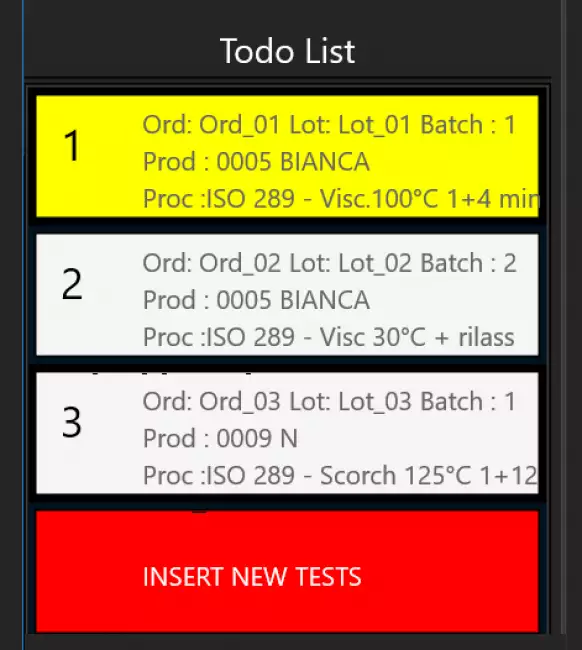
The instrument sequentially executes the list of tests that you have prepared in the ToDoList.
Each test can include test configurations independent of the previous one.
At the end of each test the instrument prepares the required configuration:
• Adjust the test temperature according to the required procedure
• Sets the test time
• Adapts the axes of the graph
• Selects the tolerance limits for the product to be tested.
You just have to insert the specimen and press start.

Management of Test Results 
The results and test curves of all the tests carried out are saved in the Gibitre SQL database and are available through the Datagest program.

Datagest is the Laboratory Information Management System (LIMS) which is always installed in combination with all Gibitre instrument-control programs.
The program is the collector for all the test result produced with the instruments connected and permits to manage the common Archives used by the instruments (Product List, Customer List, Tolerance limits, Order List, etc)


Custom Setups 
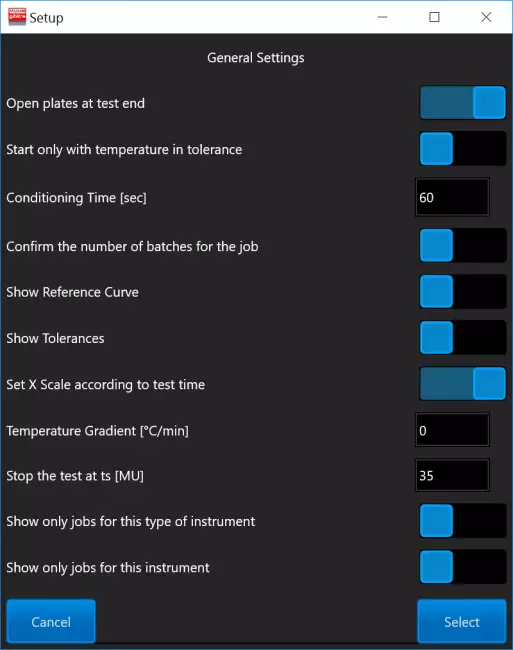
The Instrument Configuration page allows you to adapt the operating modes to your needs.
The configurations are saved and applied with each new opening.
The configurations are editable based on the operator access level.

Test Curves 
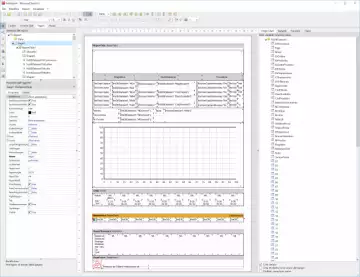
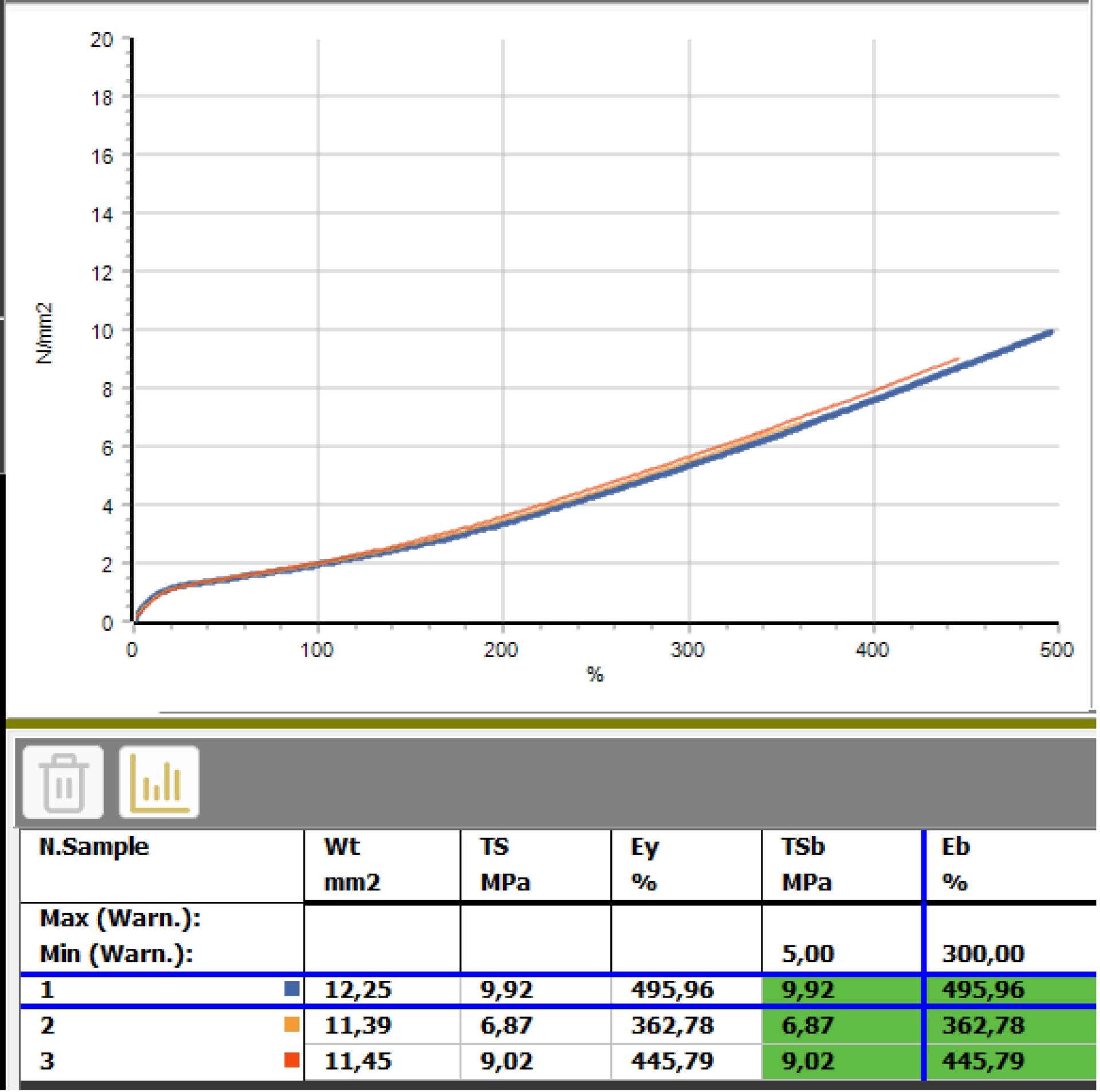
• The curves relating to the tests carried out are shown in different colors to associate them immediately with the relative results.
• By selecting a result, the corresponding curve is automatically highlighted.
• The graphical functions integrated in the programs (scale settings, the number of divisions and zoom) allow you to analyze the curves in detail.
• All the curves are saved in the database together with the test results.

Option: Variable Rotor Rotation Speed 
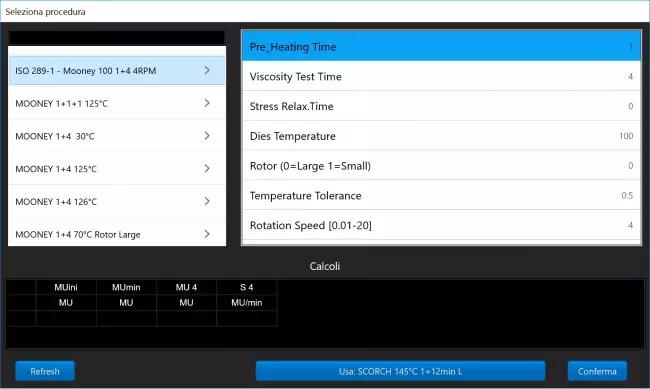
Optional configuration of the MooneyCheck-Drive instrument for managing the rotor speed during the test.
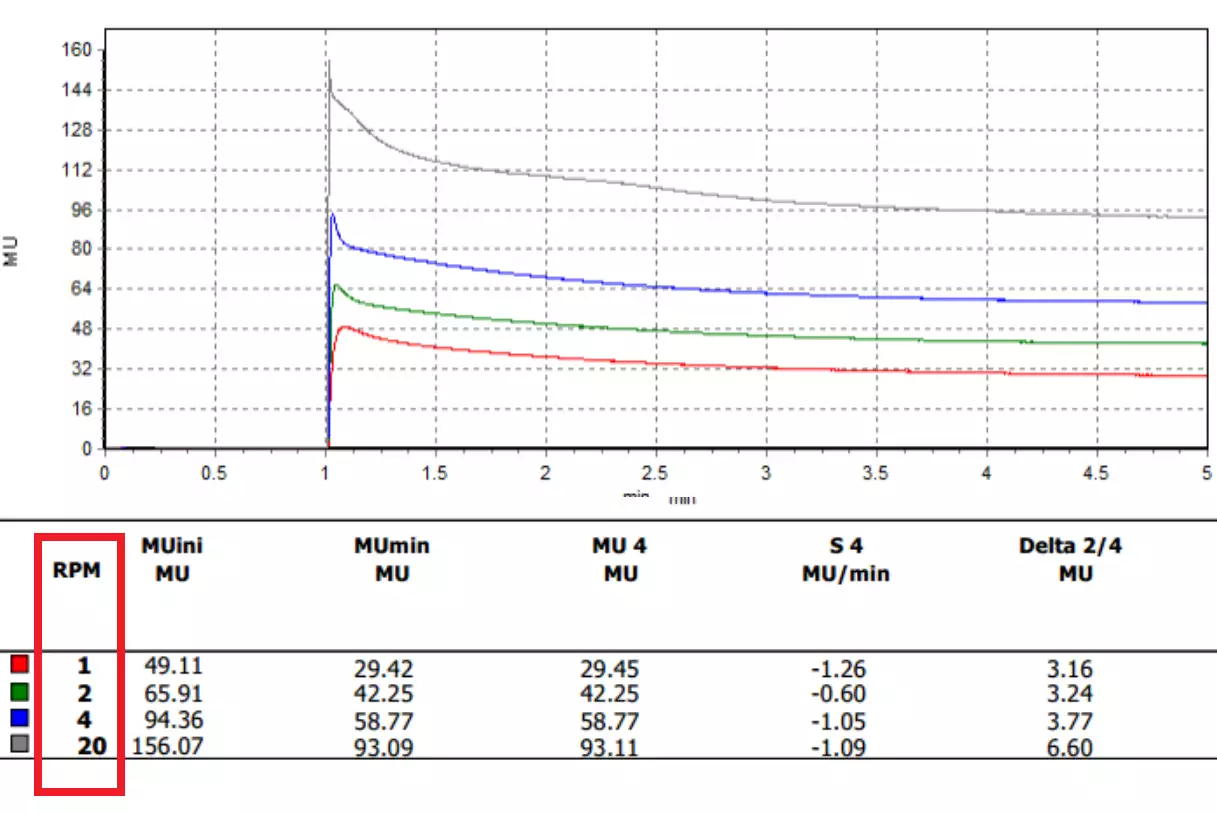
• The configuration allows to define the Rotation Speed as a configurable parameter of the Test Procedure.
• The speed can be set between 0.01 and 20 RPM.
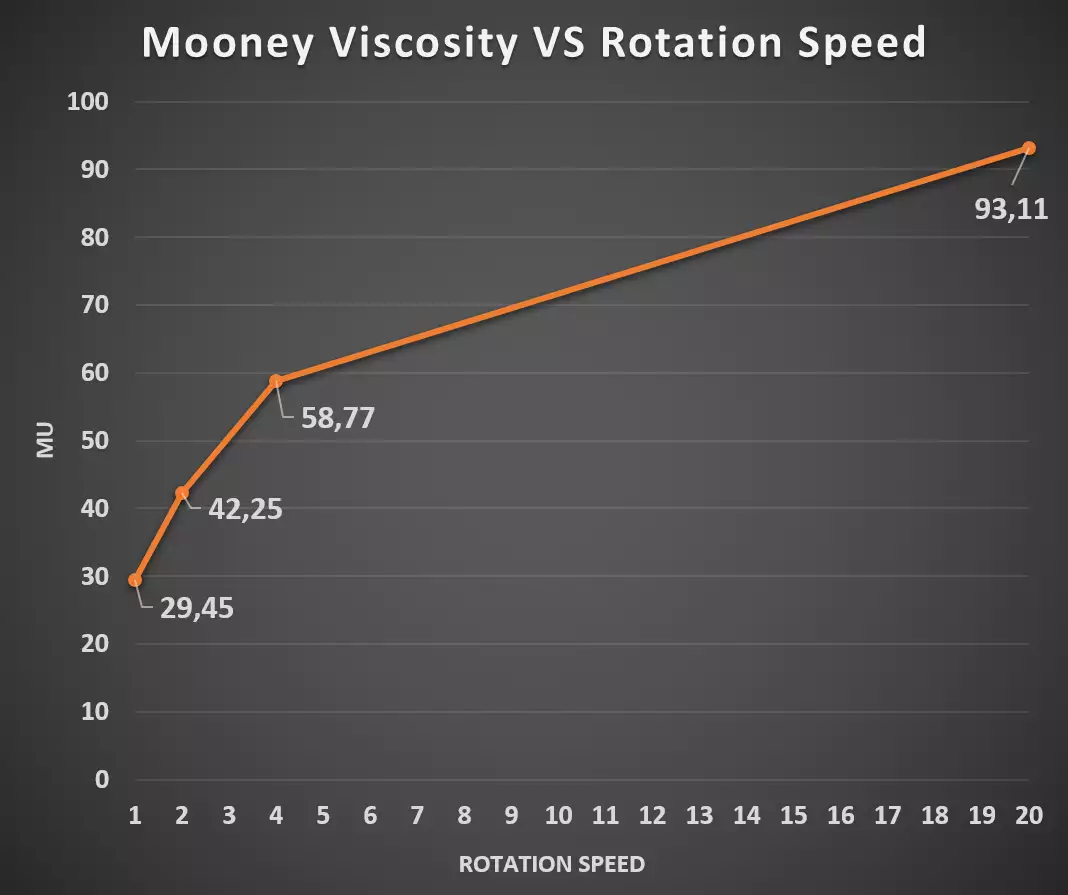
• The execution of tests at different speeds allow to evaluate the behavior of your product according to the shear rate and to simulate the behavior of the product in the conditions of use.


Tolerance Limits 
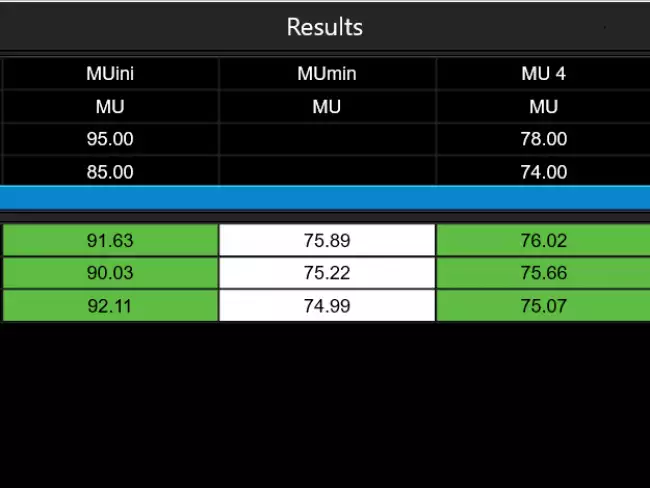
The Datagest program allows you to define specific tolerance limits for each Product, Customer, Test Procedure and Aging Treatment.
For each result to be calculated, tolerance limits and alarm limits can be defined.
The comparison between the results and the tolerance limits is carried out automatically at the end of each test: the test results are colored (Green, Yellow or Red) based on the outcome of the comparison with the limits.
The outcome of the check is saved in the database together with the results.

Statistics of ongoing tests 
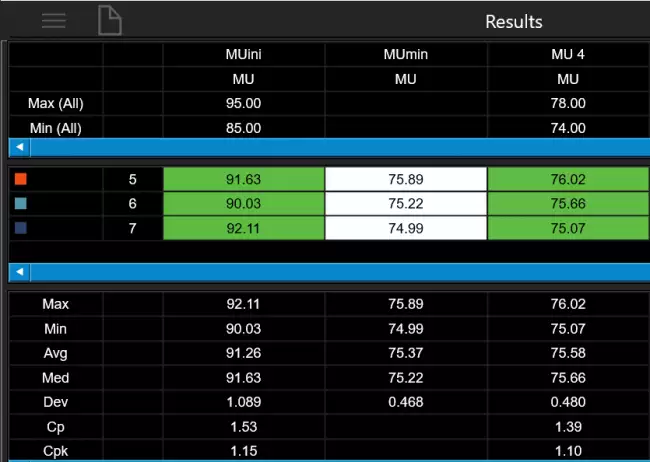
The programs automatically process the statistical analysis of the tests in progress by calculating:
• Maximum
• Minimum
• Average
• Median
• Standard deviation
• Cp
• Cpk
In addition, the Gaussian curve relative to the results is shown together with the tolerance limits to immediately highlight the progress of the tests in progress.
The Datagest program allows you to process more detailed statistics related to the saved results and to represent X and R Charts by grouping data by order, batch, batch, date, etc.

Test Procedures 
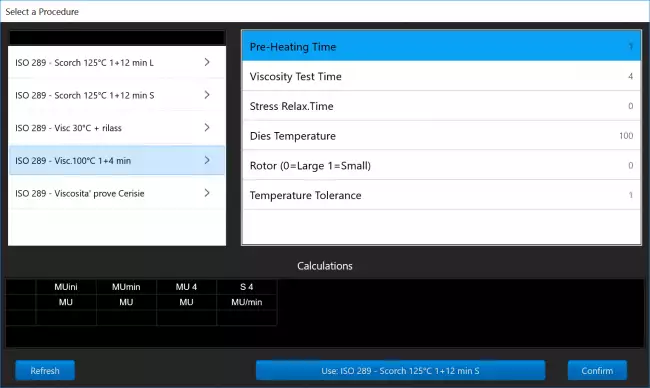
The SQL database that is installed together with the tools contains predefined test procedures for each type of Gibitre tool.
Test procedures contain:
• settings for automatic instrument adjustment
• the list of results to be calculated on the basis of what is required by international standards.
The Datagest program allows you to: copy, modify, create the Test Procedures to adapt them to your needs.

Test procedures can be exported and imported. This allows Gibitre Remote Support to support you in the preparation and testing of customized Test Procedures.


Language Selection 
All the programs produced by Gibitre are multi-language and allow the operator to select the language of use.
The test report can be produced in the desired language regardless of the language of use of the program.
The languages available at the moment are: Italian, English, French, German, Spanish, Portuguese, Russian, Polish, Czech, Turkish, Japanese, Chinese.


Hardware requirements 
• Programs can be installed on standard PCs with WINDOWS 10 or 11 OPERATING SYSTEM.
• The CONNECTION between the instruments and the PC is made using the USB CABLE supplied with the instrument.
• The programs are COMPATIBLE WITH ANTIVIRUS, and other programs installed on the PC.



Gibitre Instruments
Via dell'industria, 18
Bergamo (Italy)
te. +39 035 461146
www.gibitre.it
info@gibitre.it

Copyright Gibitre Instruments
The new Release 10 of the program optimizes the identification of the tests, the management of the instrument and stores the Results in the Gibitre SQL database.
Campi di applicazione  >  Prove su pneumatici  >  Rheocheck MD - Drive
MooneyCheck - Software
software mooney: Gibitre yazılımı. Mooney viskozimetresini kontrol etmek için MooneyCheck yazılımı. Grafikler, sonuçlar ve tolerans kontrolü içeren ana sayfa.
Get a Quotation

The new Release 10 of the program optimizes the identification of the tests, the management of the instrument and stores the Results in the Gibitre SQL database.

Smart Test Identification 

One of the key characteristics to make an instrument functional is the simplicity in identifying the tests to be carried out.
The new Gibitre release 10 programs allow you to:
• Reduce the time for insertion
• Do not make identification errors
• Identify the correct test procedure for the product
• Have a complete traceability of the archived Results.

software mooney: Tek Tıkla Kimlik Kanıtı Girin
Tek Tıkla Kimlik Kanıtı Girin

Performance of a sequence of tests 

The instrument sequentially executes the list of tests that you have prepared in the ToDoList.
Each test can include test configurations independent of the previous one.
At the end of each test the instrument prepares the required configuration:
• Adjust the test temperature according to the required procedure
• Sets the test time
• Adapts the axes of the graph
• Selects the tolerance limits for the product to be tested.
You just have to insert the specimen and press start.

software mooney: Çalışma Programı
Çalışma Programı

Management of Test Results 

The results and test curves of all the tests carried out are saved in the Gibitre SQL database and are available through the Datagest program.

Datagest is the Laboratory Information Management System (LIMS) which is always installed in combination with all Gibitre instrument-control programs.
The program is the collector for all the test result produced with the instruments connected and permits to manage the common Archives used by the instruments (Product List, Customer List, Tolerance limits, Order List, etc)

software mooney: Datagest: Laboratuvarı için Bir Beyin
Datagest: Laboratuvarı için Bir Beyin
 

Custom Setups 

The Instrument Configuration page allows you to adapt the operating modes to your needs.
The configurations are saved and applied with each new opening.
The configurations are editable based on the operator access level.

software mooney: Aracı çalışma şeklinize uyacak şekilde yapılandırın
Aracı çalışma şeklinize uyacak şekilde yapılandırın

Test Curves 

• The curves relating to the tests carried out are shown in different colors to associate them immediately with the relative results.
• By selecting a result, the corresponding curve is automatically highlighted.
• The graphical functions integrated in the programs (scale settings, the number of divisions and zoom) allow you to analyze the curves in detail.
• All the curves are saved in the database together with the test results.

software mooney: Renkli test eğrileri: bir bakışta sonuçlar
Renkli test eğrileri: bir bakışta sonuçlar

Option: Variable Rotor Rotation Speed 

Optional configuration of the MooneyCheck-Drive instrument for managing the rotor speed during the test.
• The configuration allows to define the Rotation Speed as a configurable parameter of the Test Procedure.
• The speed can be set between 0.01 and 20 RPM.
• The execution of tests at different speeds allow to evaluate the behavior of your product according to the shear rate and to simulate the behavior of the product in the conditions of use.

software mooney: Gibitre yazılımı. Mooney Viskozimetreyi kontrol etmek için Mooney-Check programı. Farklı rotor hızları ile yapılan test çalışmalarının listesi. software mooney: Gibitre yazılımı. Mooney Viskozimetreyi kontrol etmek için Mooney-Check programı. Farklı rotor hızları ile yapılan test çalışmalarının listesi. software mooney: Gibitre yazılımı. Özelleştirilebilir test raporları. Raporlar, ilgili test eğrisini tanımak için testlerin farklı renklerle tanımlanmasına olanak tanır. software mooney: Mooney viskozimetre: ayarlanabilir rotor hızı.

Tolerance Limits 

The Datagest program allows you to define specific tolerance limits for each Product, Customer, Test Procedure and Aging Treatment.
For each result to be calculated, tolerance limits and alarm limits can be defined.
The comparison between the results and the tolerance limits is carried out automatically at the end of each test: the test results are colored (Green, Yellow or Red) based on the outcome of the comparison with the limits.
The outcome of the check is saved in the database together with the results.

software mooney: Tolerans sınırlarının kesin yönetimi
Tolerans sınırlarının kesin yönetimi

Statistics of ongoing tests 

The programs automatically process the statistical analysis of the tests in progress by calculating:
• Maximum
• Minimum
• Average
• Median
• Standard deviation
• Cp
• Cpk
In addition, the Gaussian curve relative to the results is shown together with the tolerance limits to immediately highlight the progress of the tests in progress.
The Datagest program allows you to process more detailed statistics related to the saved results and to represent X and R Charts by grouping data by order, batch, batch, date, etc.

software mooney: İstatistiksel Analiz: anında geri bildirim
İstatistiksel Analiz: anında geri bildirim

Test Procedures 

The SQL database that is installed together with the tools contains predefined test procedures for each type of Gibitre tool.
Test procedures contain:
• settings for automatic instrument adjustment
• the list of results to be calculated on the basis of what is required by international standards.
The Datagest program allows you to: copy, modify, create the Test Procedures to adapt them to your needs.

Test procedures can be exported and imported. This allows Gibitre Remote Support to support you in the preparation and testing of customized Test Procedures.

software mooney: Test Prosedürleri: Tam Test Kontrolü
Test Prosedürleri: Tam Test Kontrolü

Language Selection 

All the programs produced by Gibitre are multi-language and allow the operator to select the language of use.
The test report can be produced in the desired language regardless of the language of use of the program.
The languages available at the moment are: Italian, English, French, German, Spanish, Portuguese, Russian, Polish, Czech, Turkish, Japanese, Chinese.

software mooney: Dilinizi seçin
Dilinizi seçin

Hardware requirements 

• Programs can be installed on standard PCs with WINDOWS 10 or 11 OPERATING SYSTEM.
• The CONNECTION between the instruments and the PC is made using the USB CABLE supplied with the instrument.
• The programs are COMPATIBLE WITH ANTIVIRUS, and other programs installed on the PC.

software mooney: Standart bir bilgisayar yeterlidir
Standart bir bilgisayar yeterlidir
Download
General catalogue mail request

Mooney Check - Drive
Vedi anche: ISO 289, ASTM D1646 ve ASTM D3346 standartlarına uygun viskozite testleri için Drive model Mooney-Check viskozimetre. Cihazın tam görünümü.
See Also   >
Mooney Check: Test Results
Vedi anche: Mooney viskozimetre: yazılım hesaplama formülleri: yanma süresi.
See Also   >
Datagest Software
Vedi anche: Datagest: Laboratuvarı için Bir Beyin
See Also   >
News
Call to action
Ask for quotation
a guided way to ask
for a quotation
Mail
info@gibitre.it
The good old e-mail
ready for every season
Phone
+39 035 460146
We welcome your calls Monday through Friday from 8:30 a.m. to 5:30 p.m. in your local time zone.
Newsletter
Subscribe
Stay updated
with the last news
of your sector
Local agent
from: -
See the whole list

In your country
in your language
at your service
Gibitre Instruments S.r.l., Via dell'industria 73, 24126 Bergamo Italia, pec@gibitre-instruments.it P. IVA: IT02827900164 CCIAA REA Bergamo: 326486 | ©2018 - 2026 Gibitre Instruments
Optimist.it
Welcome to the Gibitre Instruments web site
Please chose the preferred Cookie Management.
Benvenuti nel sito Gibitre Instruments
Per continuare scegliete la Gestione dei Cookie che preferite.
Cookies policy
For detailed informations about the use of cookies, please read our
Cookies Management Practice.

Gestione dei Cookies
Per maggiori informazioni sui cookie utilizzati consultate la nostra
Procedura sull'Uso dei Cookies.