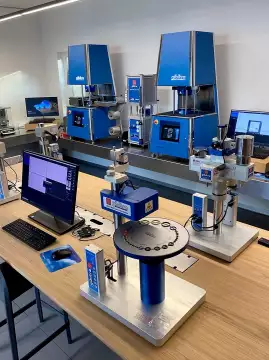
HardnessCheck - Software
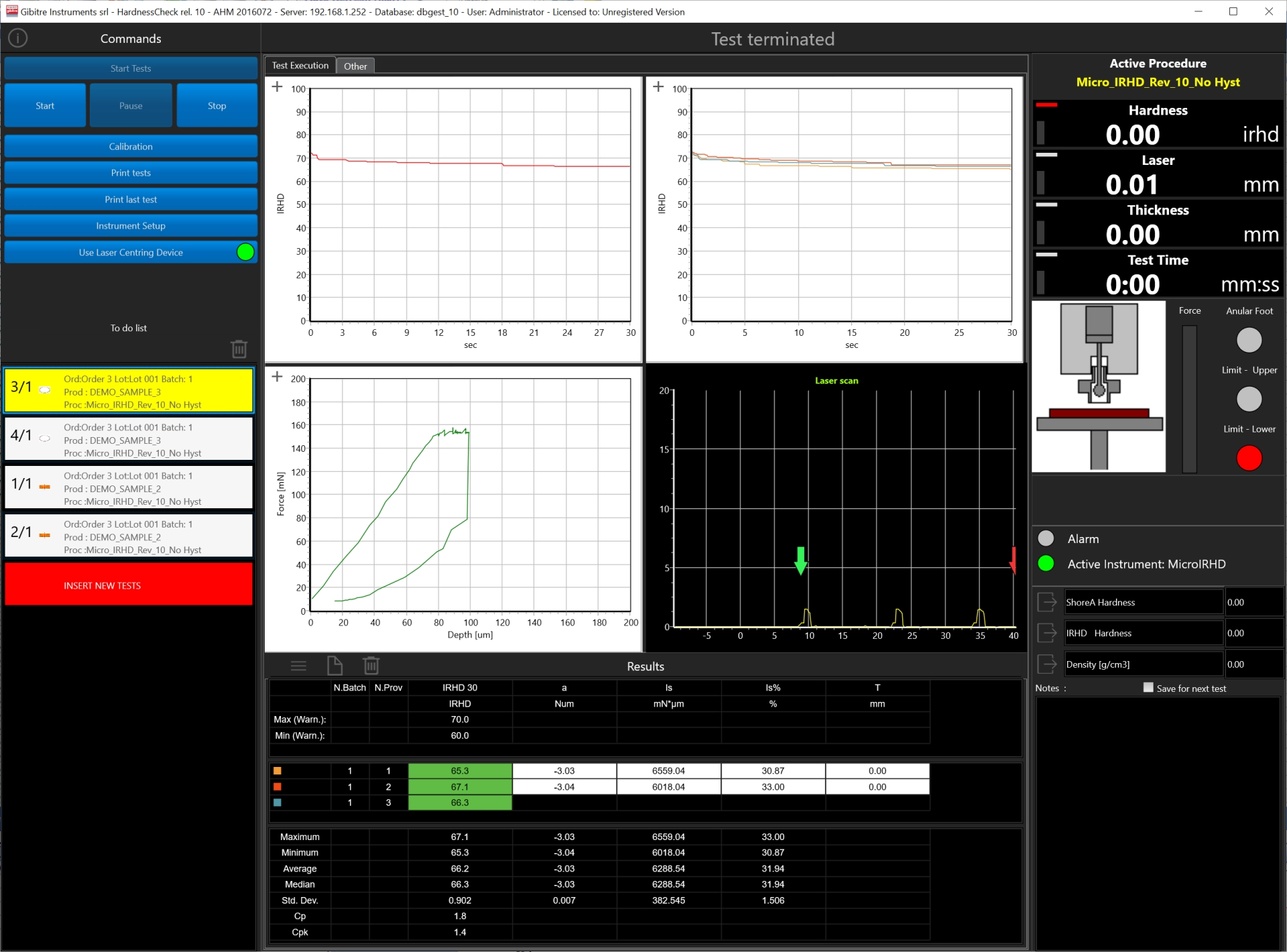
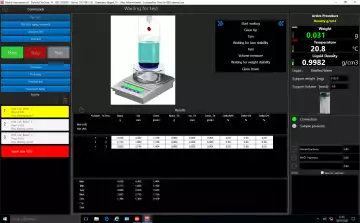
The HardnessCheck software allows you to manage all the functions of the Gibitre hardness testers and to archive the Results in the SQL Database.


Main Characteristics 
• The software is compatible with Windows 10 and 11.
• Connection between PC and Durometer using the supplied USB cable
• Multiple instruments connected to the same PC can be used simultaneously.
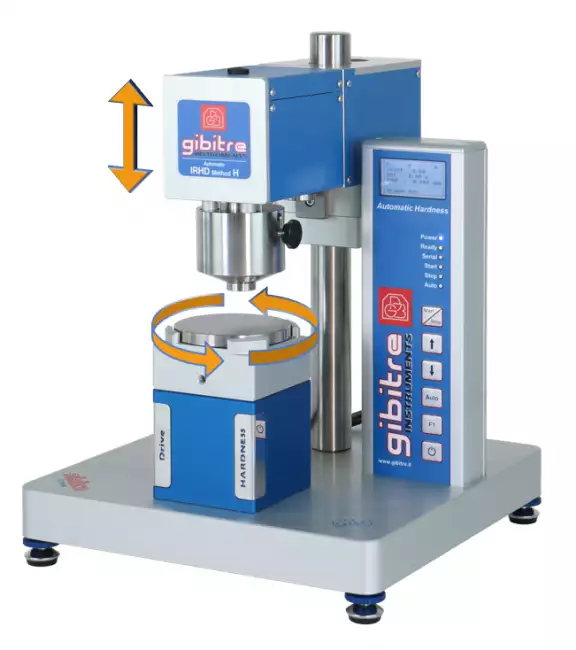
• The program allows to carry out tests automatically in different points of the specimen (with optional rotating plate).
• The program saves all results in the Gibitre SQl database for complete traceability of your tests.
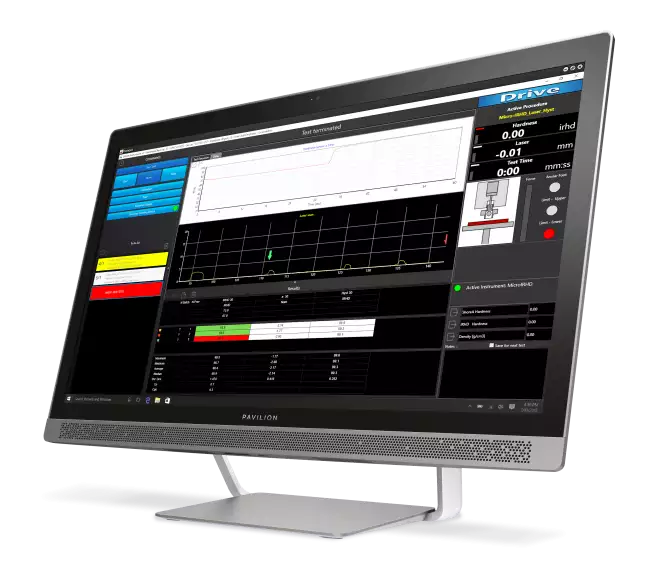

Production Control or Research ? 
The software incorporates some features that make it IDEAL FOR PRODUCTION CONTROL:
• Quick identification of the test
• Automatic execution of the test in several points of the specimen (with optional rotating plate)
• Comparison with the tolerance limits
• Statistical analysis of the tests in progress
• Automatic saving of results in the SQL database.

More advanced features allow you to use it as a real R&D TOOL:
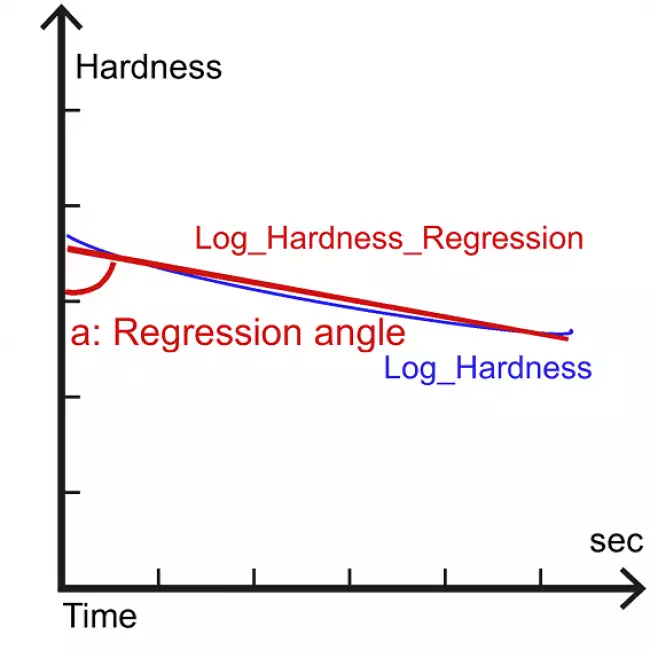
- Regression analysis
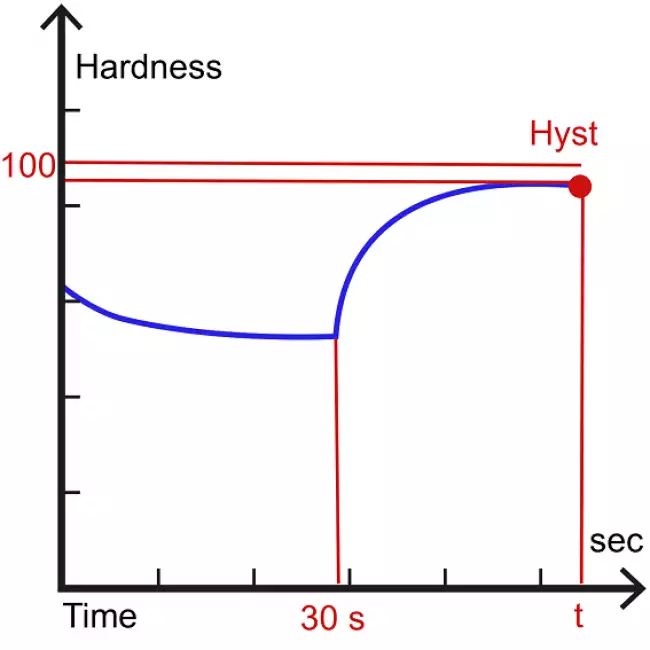
- Hysteresis analysis
- Exports of the points of the Hardness-Time curves
- Possibility to modify the standard test parameters

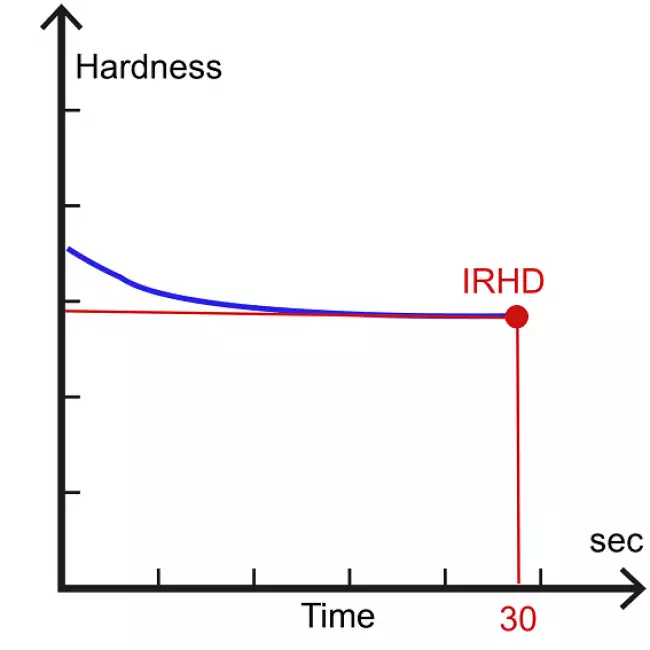
Calculated Results: IRHD Hardness 
The software includes all the calculations required by ISO 48-2 and ASTM D1415 and some calculations for advanced analysis of the results.
The dedicated page describes all the available calculations.


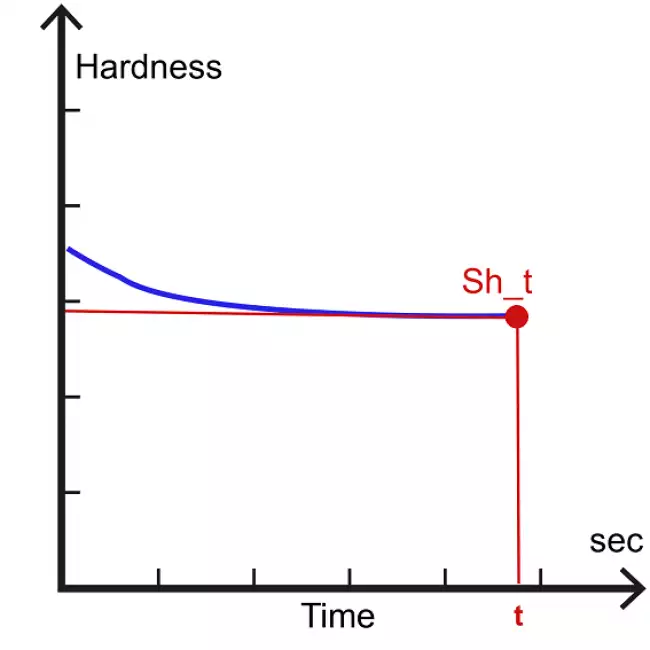
Calculated Results: SHORE Hardness 
The software includes all the calculations required by ISO 48-4 and ASTM D2240 and some calculations for advanced analysis of the results.
The dedicated page describes all the available calculations.

Management of Test Results 
The results and test curves of all the tests carried out are saved in the Gibitre SQL database and are available through the Datagest program.

Datagest is the Laboratory Information Management System (LIMS) which is always installed in combination with all Gibitre instrument-control programs.
The program is the collector for all the test result produced with the instruments connected and permits to manage the common Archives used by the instruments (Product List, Customer List, Tolerance limits, Order List, etc)


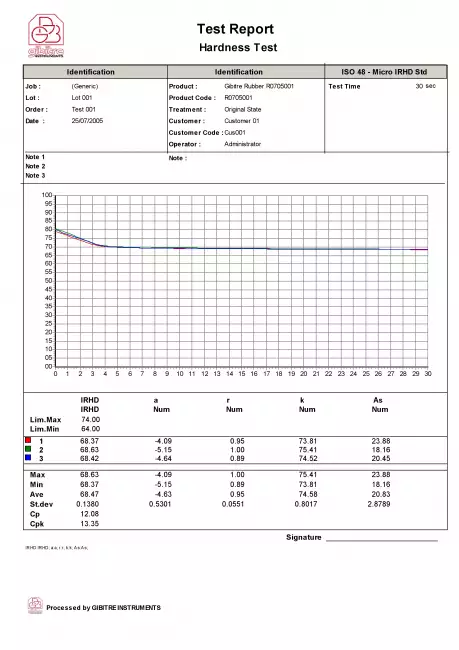
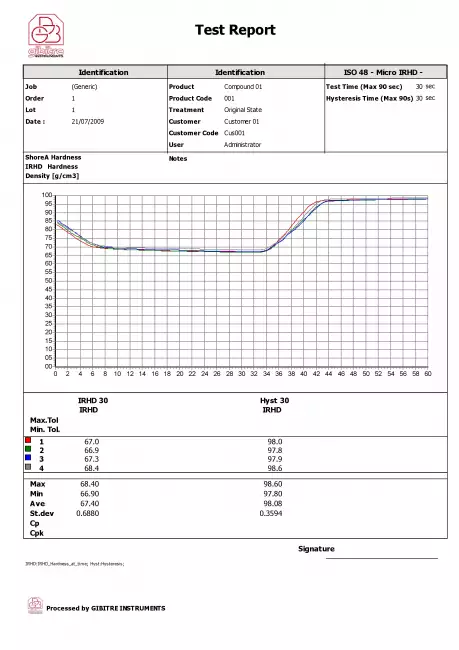
Test report 
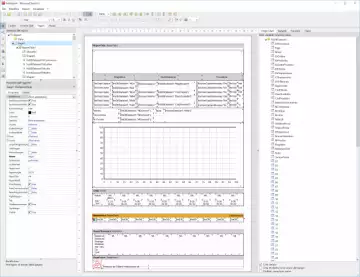
Can be printed or saved to pdf in one of the available languages. The format of the Test Report can be customized by the user.


Tolerance Limits 
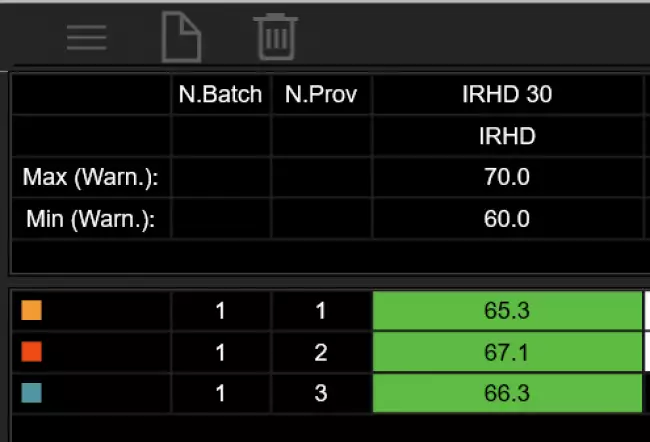
The Datagest program allows you to define specific tolerance limits for each Product, Customer, Test Procedure and Aging Treatment.
For each result to be calculated, tolerance limits and alarm limits can be defined.
The comparison between the results and the tolerance limits is carried out automatically at the end of each test: the test results are colored (Green, Yellow or Red) based on the outcome of the comparison with the limits.
The outcome of the check is saved in the database together with the results.

Statistics of ongoing tests 
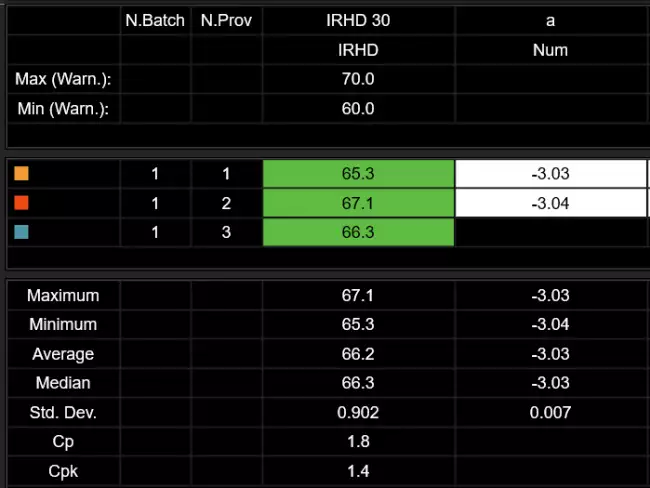
The programs automatically process the statistical analysis of the tests in progress by calculating:
• Maximum
• Minimum
• Average
• Median
• Standard deviation
• Cp
• Cpk
In addition, the Gaussian curve relative to the results is shown together with the tolerance limits to immediately highlight the progress of the tests in progress.
The Datagest program allows you to process more detailed statistics related to the saved results and to represent X and R Charts by grouping data by order, batch, batch, date, etc.

Test Curves 
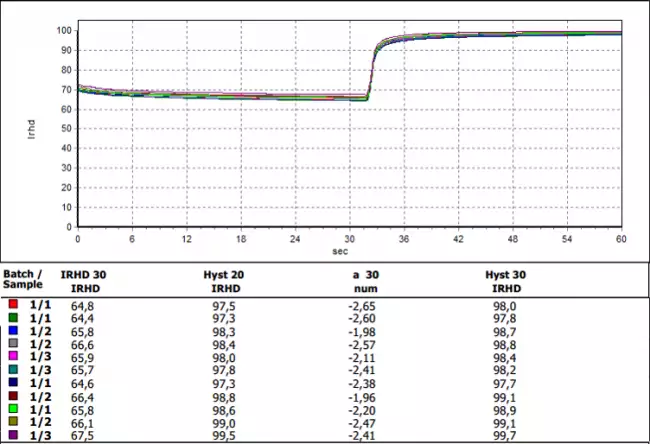
• The curves relating to the tests carried out are shown in different colors to associate them immediately with the relative results.
• By selecting a result, the corresponding curve is automatically highlighted.
• The graphical functions integrated in the programs (scale settings, the number of divisions and zoom) allow you to analyze the curves in detail.
• All the curves are saved in the database together with the test results.


Language Selection 
All the programs produced by Gibitre are multi-language and allow the operator to select the language of use.
The test report can be produced in the desired language regardless of the language of use of the program.
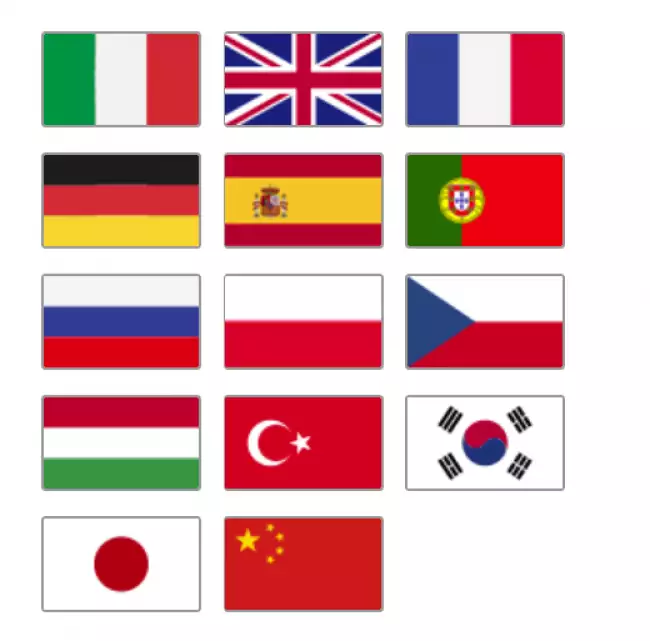
The languages available at the moment are: Italian, English, French, German, Spanish, Portuguese, Russian, Polish, Czech, Turkish, Japanese, Chinese.

Hardware requirements 
• Programs can be installed on standard PCs with WINDOWS 10 or 11 OPERATING SYSTEM.
• The CONNECTION between the instruments and the PC is made using the USB CABLE supplied with the instrument.
• The programs are COMPATIBLE WITH ANTIVIRUS, and other programs installed on the PC.



Software characteristics 
 
Results storage 
The test result sand the curves are stored in the SQL Gibitre database which is installed in combination with the software 
Software usage Languages 
Italian, English, French, Spanish, German, Portuguese, Russian, Chinese, Japanese, Turkish, Polish, Czech 
Test results calculated for each test 
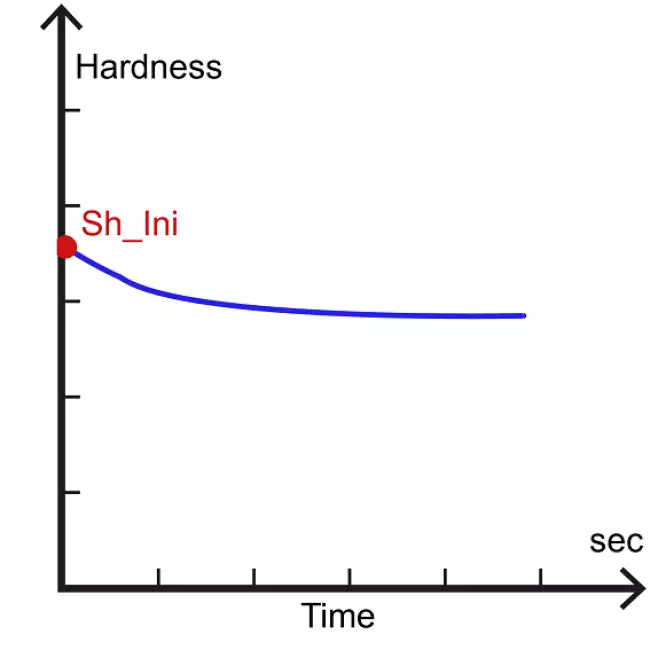
Shore units: Initial hardness, hardness values after set test times
IRHD/micro IRHD: Hardness at 30 sec (and at set test times), Angle Coeff. of Hardness Vs Time curve, Hysteresis after load removal, Correction of hardness according to sample thickness 
Regression curve analysis 
Angle coefficient of Regression curve 
Hysteresis analysis (irhd tests) 
% recovery after set time after main force removal 
Data analysis 
Mean, std. Dev., min, max, Cp, Cpk of test results. X-Chart and Gaussian distribution 
Graphs 
Rubber Relaxation curve (hardness
versus test time) in linear and logarithmics axes 
Tolerance verification 
Comparison of test results with the tolerance limits set for the product 
Personal Computer (optional) 
 
Personal Computer (optional) 
Minimum Configuration: Intel Core i5 4 GB RAM.
Compatible Operating Systems: Windows 10 or 11;
Connection to the instrument via USB Cable (included) 


Gibitre Instruments
Via dell'industria, 18
Bergamo (Italy)
te. +39 035 461146
www.gibitre.it
info@gibitre.it

Copyright Gibitre Instruments
The HardnessCheck software allows you to manage all the functions of the Gibitre hardness testers and to archive the Results in the SQL Database.
Campi di applicazione  >  Prove su pneumatici  >  Rheocheck MD - Drive
HardnessCheck - Software
software hardness: Gibitre szoftver. Hardness-Check program a keménységmérő készülékek tesztelésére. A program főoldala a vizsgálati eredményekkel és statisztikákkal.
Get a Quotation

The HardnessCheck software allows you to manage all the functions of the Gibitre hardness testers and to archive the Results in the SQL Database.

Main Characteristics 

• The software is compatible with Windows 10 and 11.
• Connection between PC and Durometer using the supplied USB cable
• Multiple instruments connected to the same PC can be used simultaneously.
• The program allows to carry out tests automatically in different points of the specimen (with optional rotating plate).
• The program saves all results in the Gibitre SQl database for complete traceability of your tests.

software hardness: Gibitre szoftver. Gibitre Hardness program a keménységmérők ellenőrzésére. PC a szoftverrel főoldalon.
Gibitre szoftver. Gibitre Hardness program a keménységmérők ellenőrzésére. PC a szoftverrel főoldalon.

Production Control or Research ? 

The software incorporates some features that make it IDEAL FOR PRODUCTION CONTROL:
• Quick identification of the test
• Automatic execution of the test in several points of the specimen (with optional rotating plate)
• Comparison with the tolerance limits
• Statistical analysis of the tests in progress
• Automatic saving of results in the SQL database.

More advanced features allow you to use it as a real R&D TOOL:
- Regression analysis
- Hysteresis analysis
- Exports of the points of the Hardness-Time curves
- Possibility to modify the standard test parameters

software hardness: Automatikus keménységellenőrző keménységmérő készülékek cserélhető Shore és irhd fejjel. A műszer vázlata, amelyen látható a motoros fej elmozdítása és a lemez elforgatása a minta több pontján történő automatikus vizsgálathoz.
Automatikus keménységellenőrző keménységmérő készülékek cserélhető Shore és irhd fejjel. A műszer vázlata, amelyen látható a motoros fej elmozdítása és a lemez elforgatása a minta több pontján történő automatikus vizsgálathoz.

Calculated Results: IRHD Hardness 

The software includes all the calculations required by ISO 48-2 and ASTM D1415 and some calculations for advanced analysis of the results.
The dedicated page describes all the available calculations.

software hardness: Gibitre-Hardness szoftver. A szoftver által végzett számítások. Az IRHD keménység kiszámítása az ISO 48-2 szabvány szerint. software hardness: Gibitre-Hardness szoftver. A szoftver által végzett számítások. Az IRHD keménység kiszámítása az ISO 48-2 szabvány szerint. software hardness: Gibitre Hardness szoftver. A keménység és az idő közötti regressziós egyenes meredekségének kiszámítása (logaritmikus tengelyek). software hardness: Hardness-Check szoftver. Hiszterézisszámítás az erő eltávolítása után a behatárolóról.
 

Calculated Results: SHORE Hardness 

The software includes all the calculations required by ISO 48-4 and ASTM D2240 and some calculations for advanced analysis of the results.
The dedicated page describes all the available calculations.

software hardness: Gibitre Hardness szoftver. A Shore-keménység kiszámítása a beállítási idő után. software hardness: Gibitre Hardness szoftver. A Shore-keménység kiszámítása a beállítási idő után. software hardness: Gibitre Hardness szoftver. A kezdeti Shore-keménység kiszámítása. software hardness: Gibitre Hardness szoftver. A keménység és az idő közötti regressziós egyenes meredekségének kiszámítása (logaritmikus tengelyek).

Management of Test Results 

The results and test curves of all the tests carried out are saved in the Gibitre SQL database and are available through the Datagest program.

Datagest is the Laboratory Information Management System (LIMS) which is always installed in combination with all Gibitre instrument-control programs.
The program is the collector for all the test result produced with the instruments connected and permits to manage the common Archives used by the instruments (Product List, Customer List, Tolerance limits, Order List, etc)

software hardness: Datagest: Agy a laboratórium számára
Datagest: Agy a laboratórium számára

Test report 

Can be printed or saved to pdf in one of the available languages. The format of the Test Report can be customized by the user.

Example of Test Report (Micro IRHD)
Example of Test Report: IRHD+Hysteresis
software hardness: Nyelv és nyomtatási formátum kiválasztása software hardness: Nyelv és nyomtatási formátum kiválasztása software hardness: Mikro irhd keménységvizsgálat. Keménységvizsgálati jelentés hiszterézisvizsgálattal.

Tolerance Limits 

The Datagest program allows you to define specific tolerance limits for each Product, Customer, Test Procedure and Aging Treatment.
For each result to be calculated, tolerance limits and alarm limits can be defined.
The comparison between the results and the tolerance limits is carried out automatically at the end of each test: the test results are colored (Green, Yellow or Red) based on the outcome of the comparison with the limits.
The outcome of the check is saved in the database together with the results.

software hardness: A tűréshatárok egyértelmű kezelése
A tűréshatárok egyértelmű kezelése

Statistics of ongoing tests 

The programs automatically process the statistical analysis of the tests in progress by calculating:
• Maximum
• Minimum
• Average
• Median
• Standard deviation
• Cp
• Cpk
In addition, the Gaussian curve relative to the results is shown together with the tolerance limits to immediately highlight the progress of the tests in progress.
The Datagest program allows you to process more detailed statistics related to the saved results and to represent X and R Charts by grouping data by order, batch, batch, date, etc.

software hardness: Statisztikai elemzés: azonnali visszajelzés
Statisztikai elemzés: azonnali visszajelzés

Test Curves 

• The curves relating to the tests carried out are shown in different colors to associate them immediately with the relative results.
• By selecting a result, the corresponding curve is automatically highlighted.
• The graphical functions integrated in the programs (scale settings, the number of divisions and zoom) allow you to analyze the curves in detail.
• All the curves are saved in the database together with the test results.

software hardness: Színes tesztgörbék: az eredmények áttekintése
Színes tesztgörbék: az eredmények áttekintése

Language Selection 

All the programs produced by Gibitre are multi-language and allow the operator to select the language of use.
The test report can be produced in the desired language regardless of the language of use of the program.
The languages available at the moment are: Italian, English, French, German, Spanish, Portuguese, Russian, Polish, Czech, Turkish, Japanese, Chinese.

software hardness: Válasszon nyelvet
Válasszon nyelvet

Hardware requirements 

• Programs can be installed on standard PCs with WINDOWS 10 or 11 OPERATING SYSTEM.
• The CONNECTION between the instruments and the PC is made using the USB CABLE supplied with the instrument.
• The programs are COMPATIBLE WITH ANTIVIRUS, and other programs installed on the PC.

software hardness: Elég egy hagyományos PC
Elég egy hagyományos PC

Technical specification

Software characteristics

Results storage  The test result sand the curves are stored in the SQL Gibitre database which is installed in combination with the software  Software usage Languages  Italian, English, French, Spanish, German, Portuguese, Russian, Chinese, Japanese, Turkish, Polish, Czech  Test results calculated for each test  Shore units: Initial hardness, hardness values after set test times
IRHD/micro IRHD: Hardness at 30 sec (and at set test times), Angle Coeff. of Hardness Vs Time curve, Hysteresis after load removal, Correction of hardness according to sample thickness 
Regression curve analysis  Angle coefficient of Regression curve  Hysteresis analysis (irhd tests)  % recovery after set time after main force removal  Data analysis  Mean, std. Dev., min, max, Cp, Cpk of test results. X-Chart and Gaussian distribution  Graphs  Rubber Relaxation curve (hardness
versus test time) in linear and logarithmics axes 
Tolerance verification  Comparison of test results with the tolerance limits set for the product 

Personal Computer (optional)

Personal Computer (optional)  Minimum Configuration: Intel Core i5 4 GB RAM.
Compatible Operating Systems: Windows 10 or 11;
Connection to the instrument via USB Cable (included) 
Download
General catalogue mail request

News
Call to action
Ask for quotation
a guided way to ask
for a quotation
Mail
info@gibitre.it
The good old e-mail
ready for every season
Phone
+39 035 460146
We welcome your calls Monday through Friday from 8:30 a.m. to 5:30 p.m. in your local time zone.
Newsletter
Subscribe
Stay updated
with the last news
of your sector
Local agent
from: -
See the whole list

In your country
in your language
at your service
Gibitre Instruments S.r.l., Via dell'industria 73, 24126 Bergamo Italia, pec@gibitre-instruments.it P. IVA: IT02827900164 CCIAA REA Bergamo: 326486 | ©2018 - 2026 Gibitre Instruments
Optimist.it
Welcome to the Gibitre Instruments web site
Please chose the preferred Cookie Management.
Benvenuti nel sito Gibitre Instruments
Per continuare scegliete la Gestione dei Cookie che preferite.
Cookies policy
For detailed informations about the use of cookies, please read our
Cookies Management Practice.

Gestione dei Cookies
Per maggiori informazioni sui cookie utilizzati consultate la nostra
Procedura sull'Uso dei Cookies.