Datagest Software
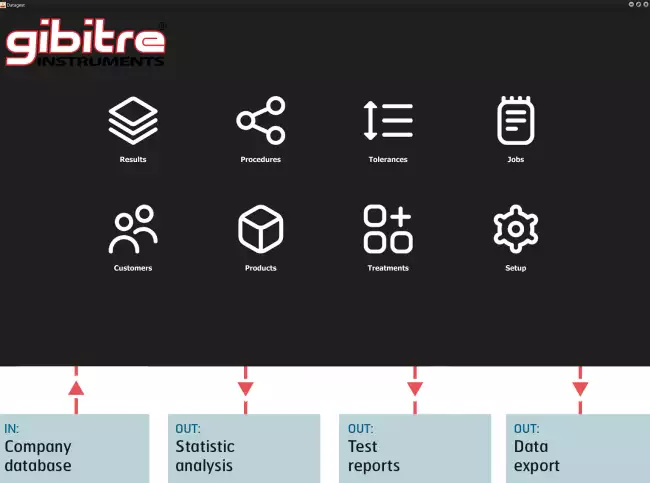
The software for data management is provided in combination with Gibitre programs and permits the management of test Results, Statistics, Tolerance Limits, Customers, Products, ageing Treatments



Overview 
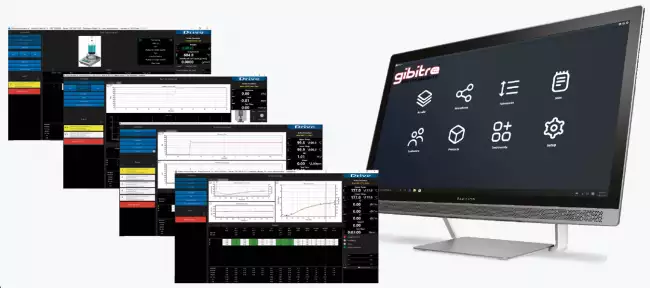
Datagest is the Laboratory Information Management System (LIMS) which is always installed in combination with all Gibitre instrument-control programs.
The program is the collector for all the test result produced with the instruments connected and permits to manage the common Archives used by the instruments (Product List, Customer List, Tolerance limits, Order List, etc)
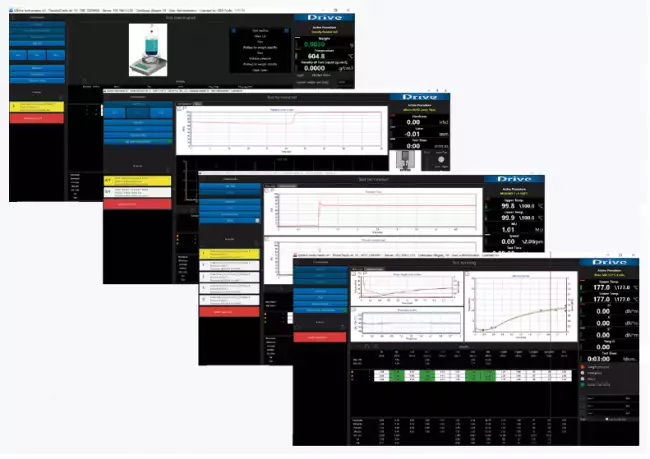


Main Functions 
The program allows you to:
• View, Filter, Print, Compare, Export the Results of tests carried out with all connected Gibitre instruments.
• Prepare, Copy, Export, Import Test procedures for connected instruments.
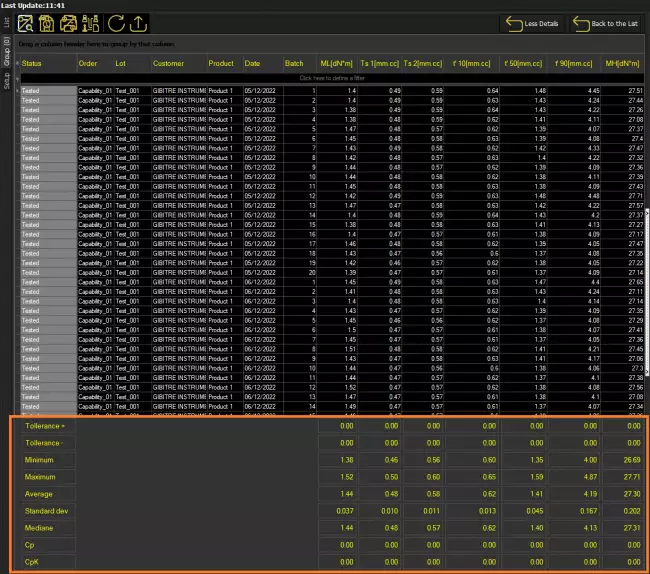
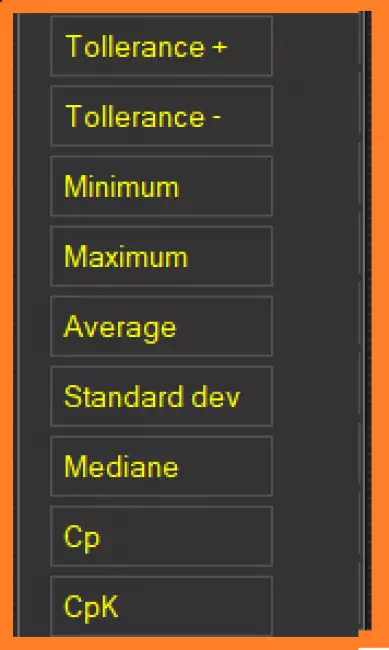
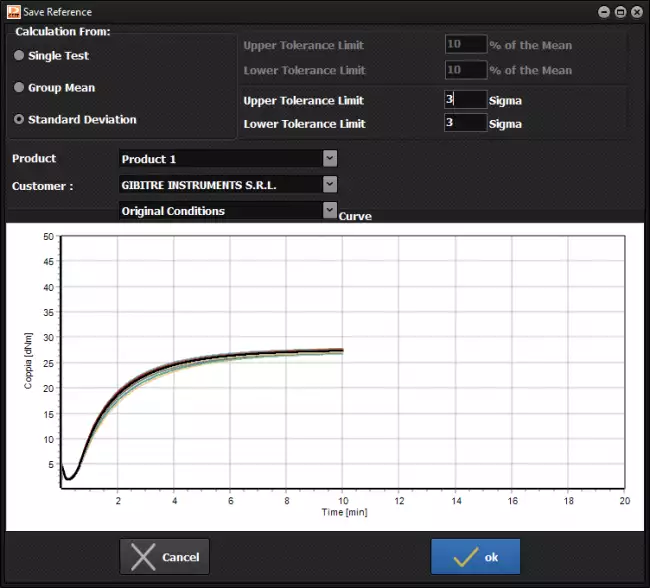
• Define tolerance limits by entering them manually or through the statistical processing of the archived results.
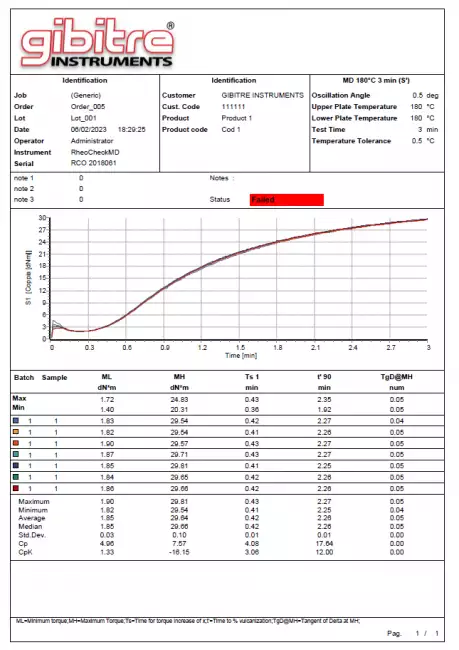
• Produce multi-instrument test reports
• Manage Credentials and Access Rights of users who access all Gibitre programs.

Gibitre Standard SQL Database 
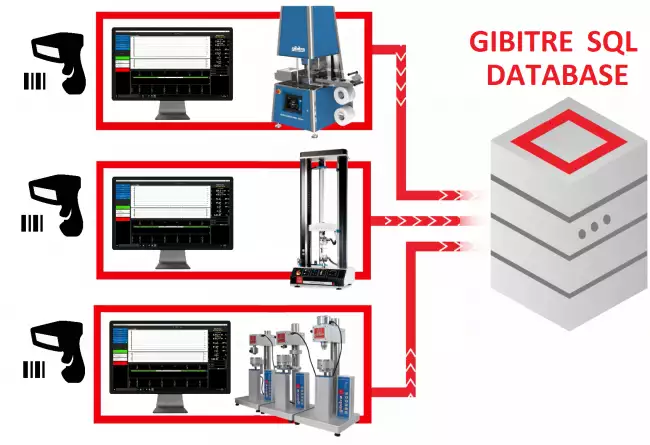
All the Gibitre programs use a database with SQL structure for saving the results.
The database can be installed inside an SQL instance present on the company server or it can be installed on a PC connected to a measuring instrument. The installation of the Microsoft SQL service (Express version) is included in the supply.


Storage of Test Results 
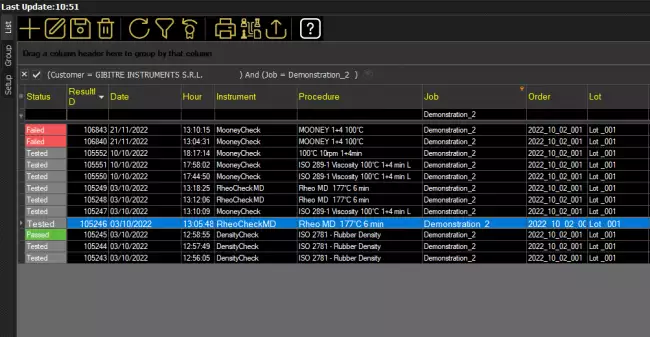
The Datagest program allows to store all the results of the tests carried out with all the Gibitre instruments connected to the database.
For each result are stored: Order, Lot,
Batch, Sample number, Job code, Product,
Customer, Aging treatment, Tolerance limits, Numerical results, Test curves, Notes, Test date and time, Operator, Instrument and Test procedure used.
• Data visualization is totally customizable.

Filtering and usage of stored Results 
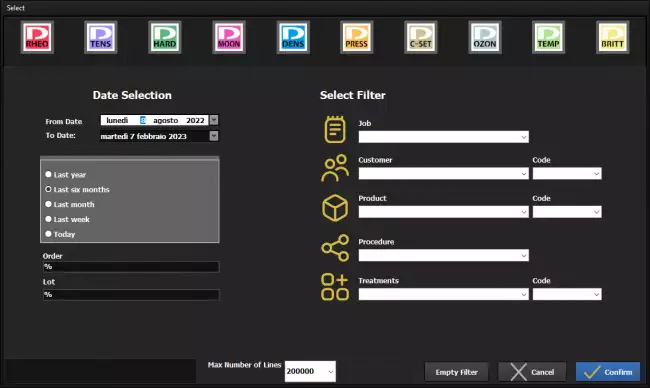
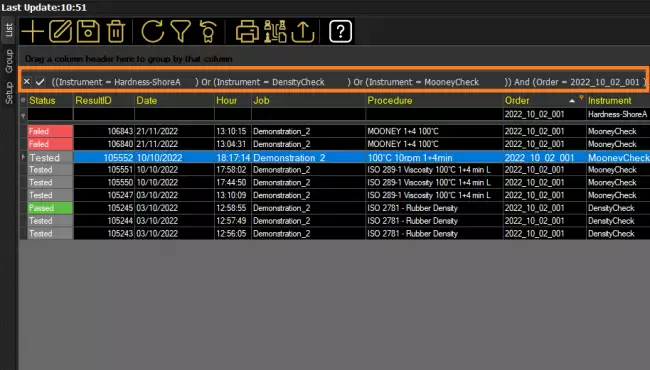
The Datagest program incorporates a sophisticated interface that lets you filter the stored data as needed.
It is possible to filter through:
• Drop down menu
• Direct text entry
• Selection of the affected lines
• Selection by analogy on each field
• Advanced filter Menu
• Hyperlink selection

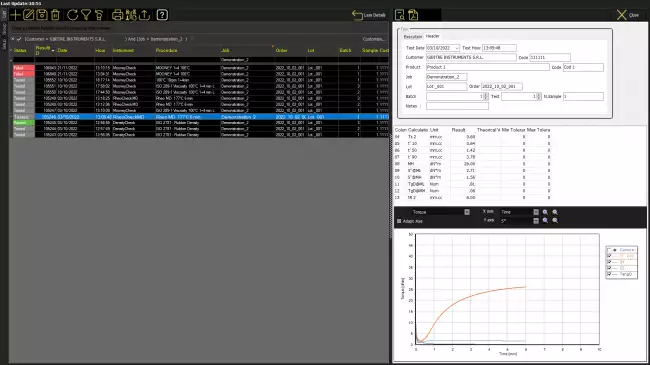
Use of Stored data: Test Details 
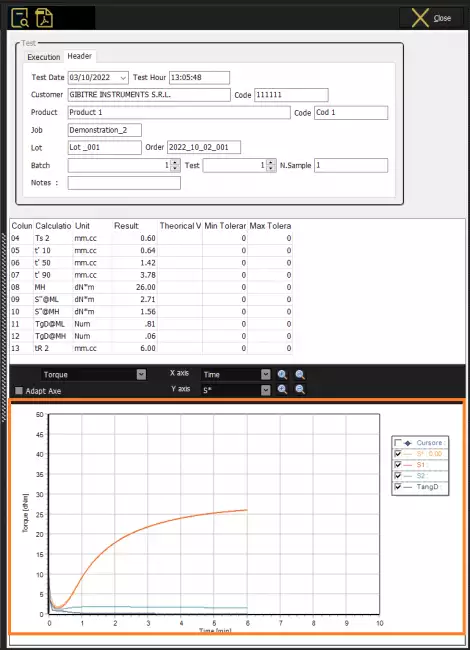
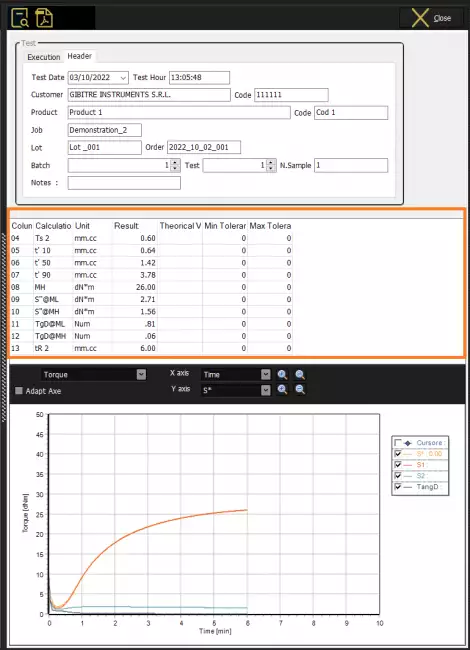
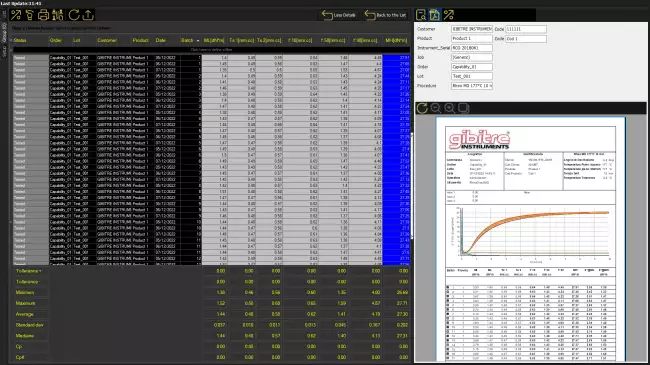
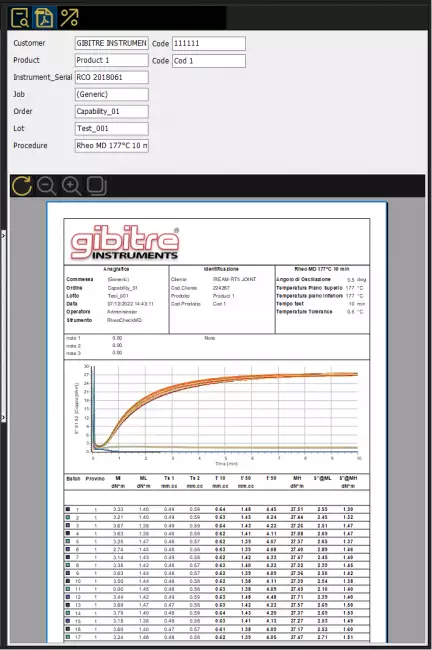
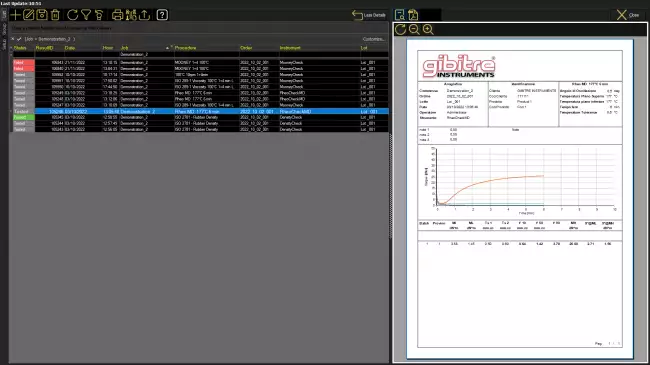
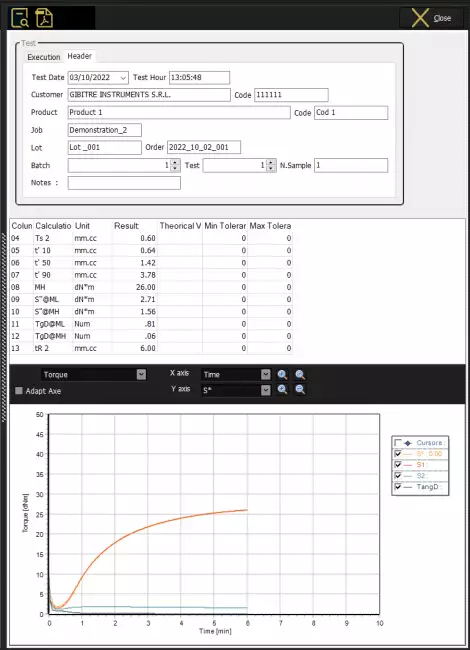
For each saved test it is possible to view:
• Numerical results
• Limits of tolerance and relative outcome
• Test curves
• Archived Notes


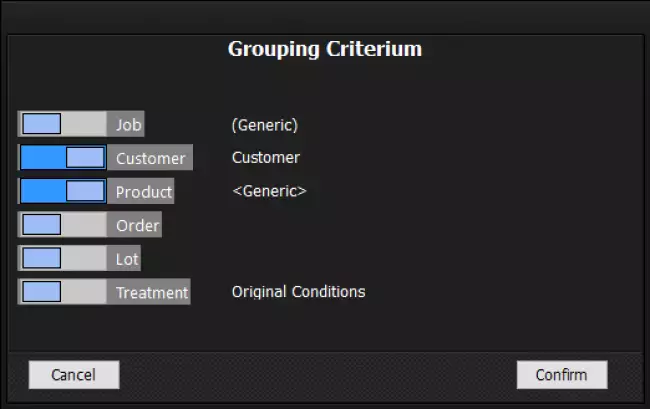
Use of Stored data: Comparison of Results and Curves 
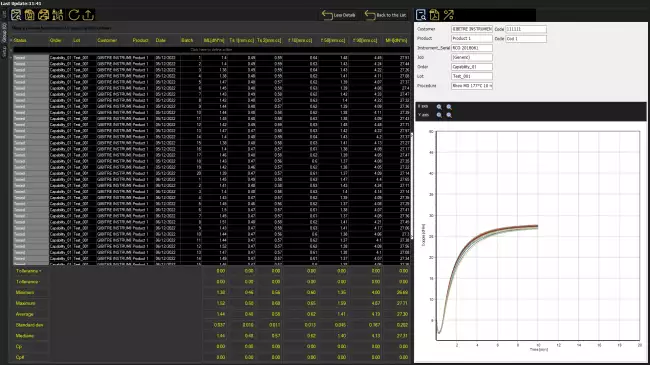
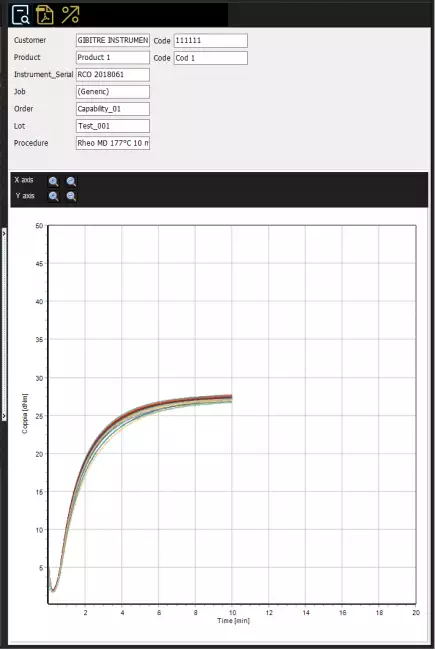
You may need to compare test results obtained in different periods or following changes in the production process.
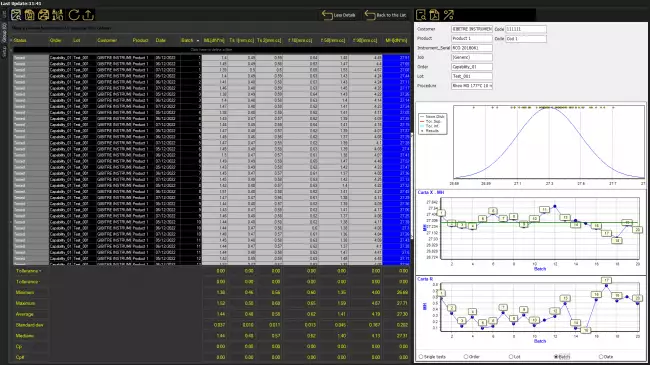
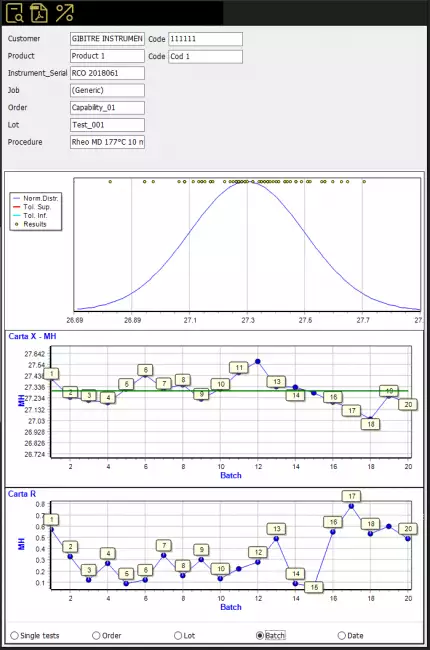
Datagest allows to:
• Overlay the selected test curves
• Produce a statistical analysis and X-R cards
• Use Pivot Tables

Tolerance and Warning Limits 
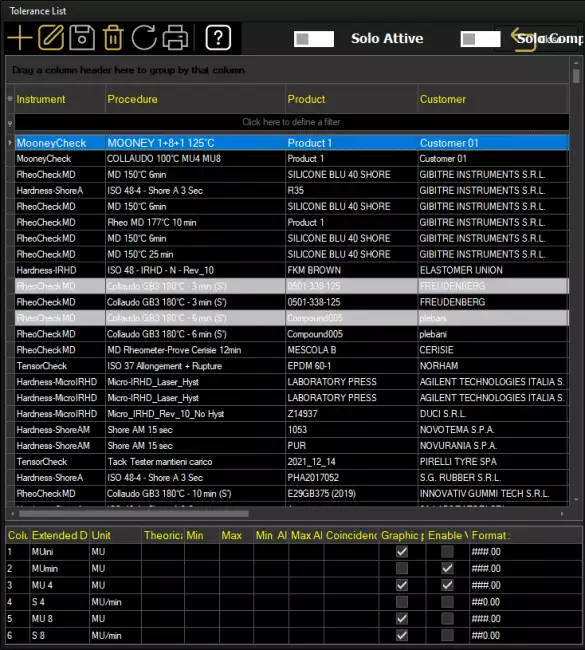
Tolerance and Alarm Limits are managed for:
• Product,
• Test procedure,
• Customer,
• Product treatment
• Date of input

Limits can be introduced:
• Manually
• By Statistical Processing of Results

Test Procedures 
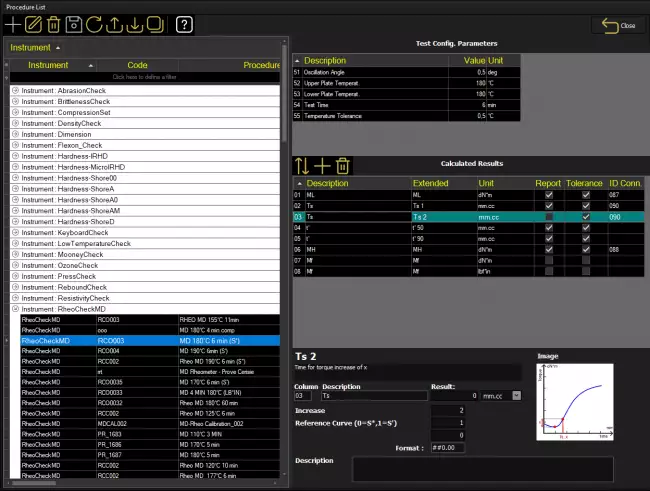
The SQL database that is installed together with the tools contains predefined test procedures for each type of Gibitre tool.
Test procedures contain:
• settings for automatic instrument adjustment
• the list of results to be calculated on the basis of what is required by international standards.
The Datagest program allows you to: copy, modify, create the Test Procedures to adapt them to your needs.

Test procedures can be exported and imported. This allows Gibitre Remote Support to support you in the preparation and testing of customized Test Procedures.


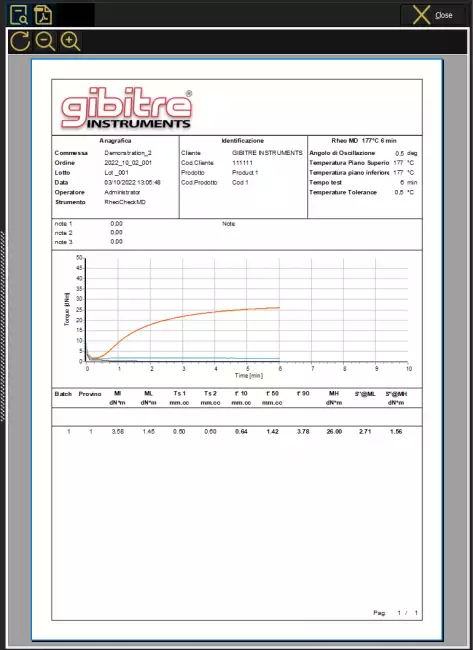
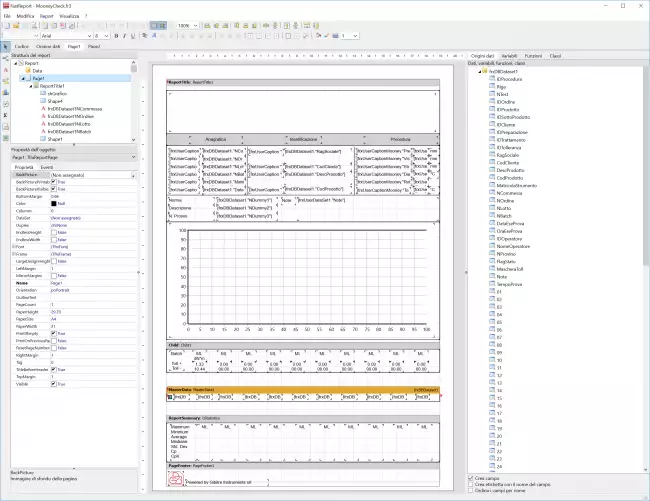
Prepare your test Report 
You can use one of the available report formats, insert your logo, one or more graphs, tolerance limits, statistics, images, legend, notes, etc.

You can select the language you prefer and print the report or better produce it in PDF, Word or Excel format.

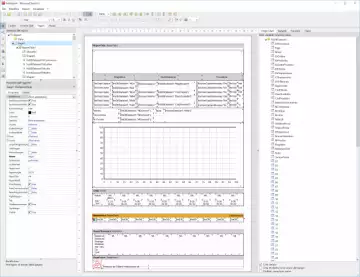
In addition, the software includes a Report Editor that allows you to:
• Create copies of the default report format
• Modify them to your liking
• Save new formats produced
• Select which format you want to use for printing.

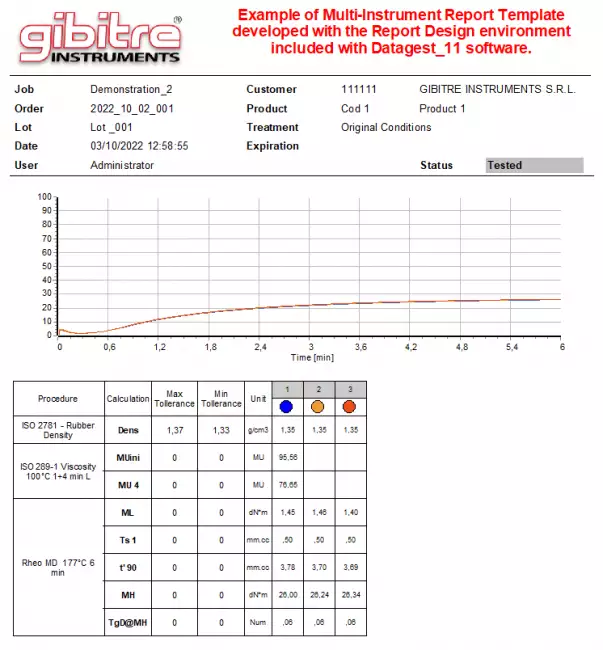
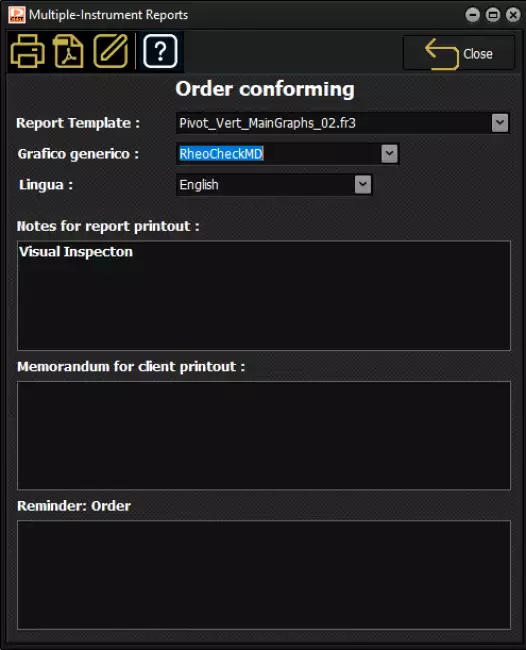
Multi-Instrument Test Reports 
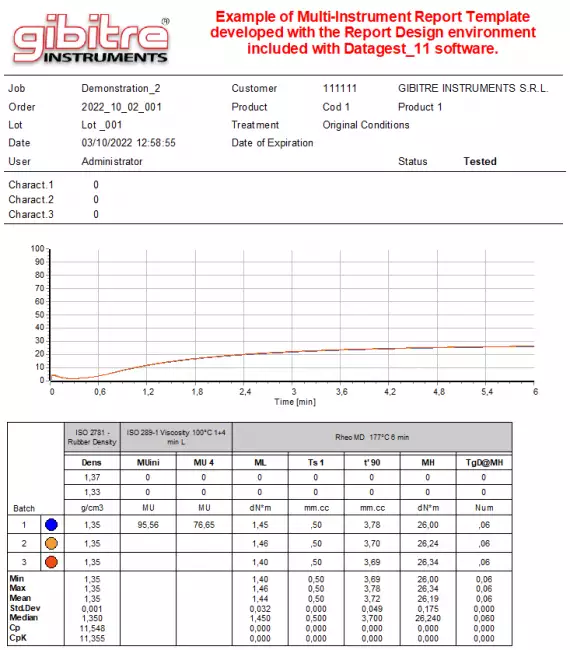
The program allows you to prepare customized reports to send the results of all tests carried out to your customers.
It's possible:
• Select Logo and Language
• Include Test Curves
• Include Tolerances and Statistics
• Include the scanned signature

Reports can be saved in Pdf or Word format (fully editable) or sent directly by e-mail
In the images some examples of reports included in the standard installation.

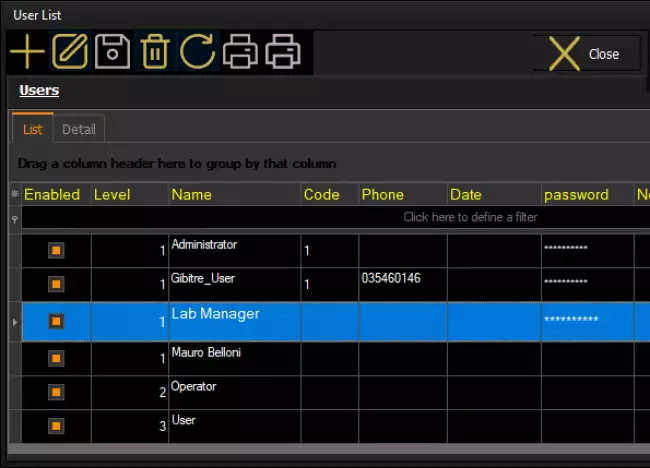
Management of Users 
Datagest program manages the list of users and their access rights to all Gibitre programs.
For each user you can set:
• Username and Password
• Access Righets (administrator, Operator, User)
• Scanned Signature to be included in the test reports.

According to the access rights, the users can:
• Edit or Delete Test Results and approval status.
• Create, Edit, Remove Test Procedures
• Create, Edit, Remove Tolerance Limits
• Create, Edit, Remove Products, Customers, Orders
• Change Instrument Setups
• Edit Report Data


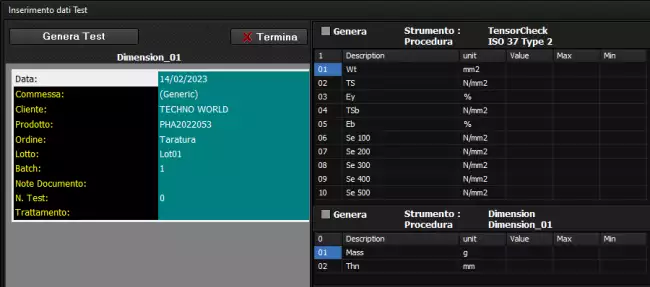
Manual Entry of Test Results 
The Datagest program allows you to manually enter the test results obtained with instruments that are not connected or that do not produce digital results.
In this way you can:
- Complete the archiving of evidence
- Produce Multi-Instrument Test Reports that include all the work done.

Export of Data 
The program is equipped with various tools for data export:
• Export Selected Results to .csv file (Excel compatible)
• Export of curve points to .csv files
• SQL query for data export to other platforms
• Excel file with dynamic data connection to the test list

In addition, procedures are provided for data export with specified paths and methods.

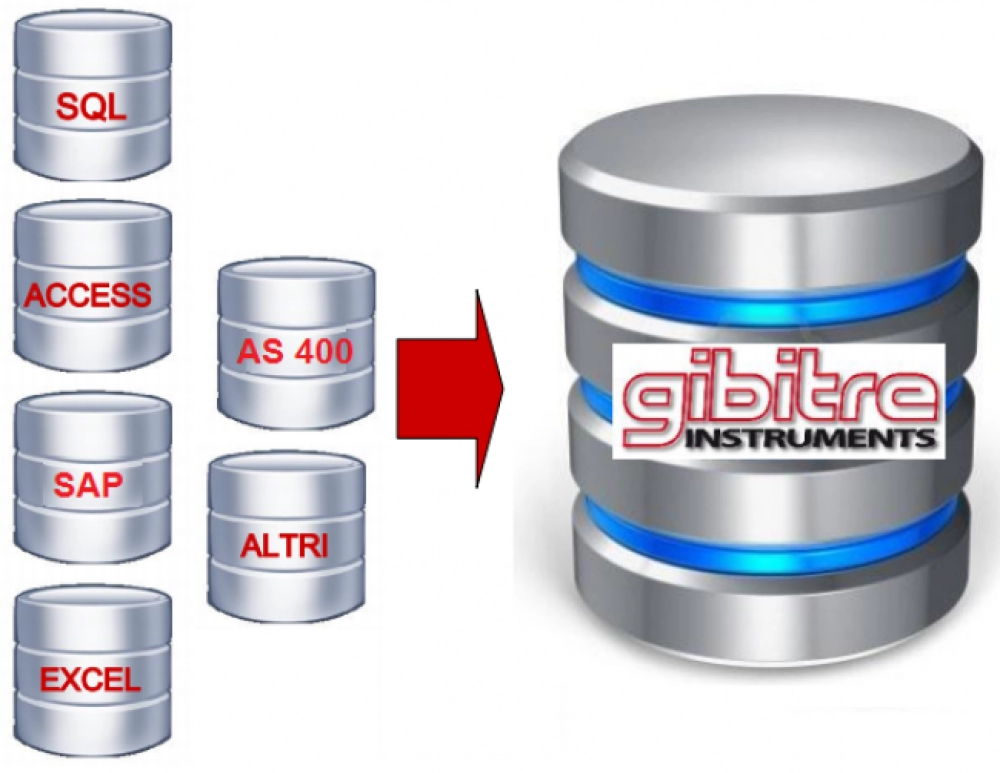
Synchronization of Data with Management Programs 
Normally, every company has a production control software where information about incoming materials, products, customers, and production orders are stored.
Normally the main control activity refers to incoming products or production control.
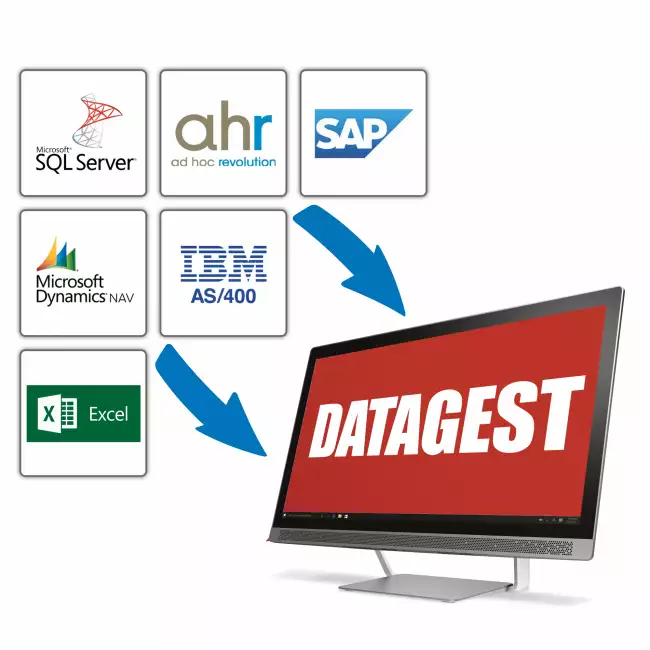
To have traceability of control activity the test results must be identified according to your identification system inserting information such as Product Code, Order, Lot Number, Customer Code (or Provider code), batch number, Operator, Date and time.
The syncronization of your company management sw and Gibitre database can be easily done using Gibitre - Company Connect program.


Language Selection 
All the programs produced by Gibitre are multi-language and allow the operator to select the language of use.
The test report can be produced in the desired language regardless of the language of use of the program.
The languages available at the moment are: Italian, English, French, German, Spanish, Portuguese, Russian, Polish, Czech, Turkish, Japanese, Chinese.


Gibitre Instruments
Via dell'industria, 18
Bergamo (Italy)
te. +39 035 461146
www.gibitre.it
info@gibitre.it

Copyright Gibitre Instruments
The software for data management is provided in combination with Gibitre programs and permits the management of test Results, Statistics, Tolerance Limits, Customers, Products, ageing Treatments
Campi di applicazione  >  Prove su pneumatici  >  Rheocheck MD - Drive
Datagest Software
software datagest: Datagest: a Brain for your Instruments
Get a Quotation

The software for data management is provided in combination with Gibitre programs and permits the management of test Results, Statistics, Tolerance Limits, Customers, Products, ageing Treatments

Overview 

Datagest is the Laboratory Information Management System (LIMS) which is always installed in combination with all Gibitre instrument-control programs.
The program is the collector for all the test result produced with the instruments connected and permits to manage the common Archives used by the instruments (Product List, Customer List, Tolerance limits, Order List, etc)

software datagest: The Test Results produced with the instruments ... software datagest: The Test Results produced with the instruments ... software datagest: Enter test Identifiction with a Click

Main Functions 

The program allows you to:
• View, Filter, Print, Compare, Export the Results of tests carried out with all connected Gibitre instruments.
• Prepare, Copy, Export, Import Test procedures for connected instruments.
• Define tolerance limits by entering them manually or through the statistical processing of the archived results.
• Produce multi-instrument test reports
• Manage Credentials and Access Rights of users who access all Gibitre programs.

software datagest: ...Managed with one single LIMS software datagest: ...Managed with one single LIMS software datagest: LIMS Datagest software for data collection: synchronization with SAP, Navision, IBM management systems, etc.

Gibitre Standard SQL Database 

All the Gibitre programs use a database with SQL structure for saving the results.
The database can be installed inside an SQL instance present on the company server or it can be installed on a PC connected to a measuring instrument. The installation of the Microsoft SQL service (Express version) is included in the supply.

software datagest: SQL: total security for your data
SQL: total security for your data
 

Storage of Test Results 

The Datagest program allows to store all the results of the tests carried out with all the Gibitre instruments connected to the database.
For each result are stored: Order, Lot,
Batch, Sample number, Job code, Product,
Customer, Aging treatment, Tolerance limits, Numerical results, Test curves, Notes, Test date and time, Operator, Instrument and Test procedure used.
• Data visualization is totally customizable.

software datagest: Datagest program version 11. Archived results selection page with all related tools. software datagest: Datagest program version 11. Archived results selection page with all related tools. software datagest: The Gibitre family of software products in version 10. The control software for the various types of instruments and the common data collection software. software datagest: The Test Results produced with the instruments ... software datagest: Enter test Identifiction with a Click

Filtering and usage of stored Results 

The Datagest program incorporates a sophisticated interface that lets you filter the stored data as needed.
It is possible to filter through:
• Drop down menu
• Direct text entry
• Selection of the affected lines
• Selection by analogy on each field
• Advanced filter Menu
• Hyperlink selection

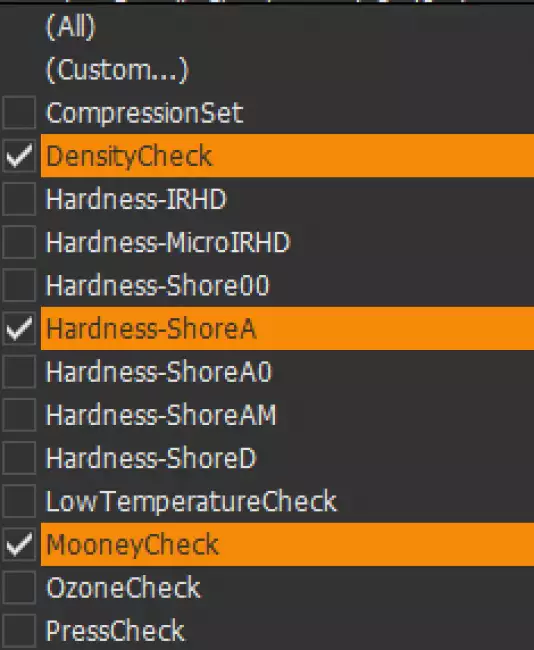
software datagest: Datagest program version 11. Example of results filter menu for multiple selection. software datagest: Datagest program version 11. Example of results filter menu for multiple selection. software datagest: Datagest program version 11. Archived results selection page with all related tools. software datagest: Datagest 11 data collection software: filter for selecting the results of a column. software datagest: Datagest program version 11. Page for defining the grouping of results to be analyzed. software datagest: The Test Results produced with the instruments ...

Use of Stored data: Test Details 

For each saved test it is possible to view:
• Numerical results
• Limits of tolerance and relative outcome
• Test curves
• Archived Notes

software datagest: Datagest program version 11. Results display page with detail of selected result. software datagest: Datagest program version 11. Results display page with detail of selected result. software datagest: Datagest 11 data collection software: Detail and preview report of an archived trial. software datagest: Datagest 11 data collection software: Reslt Detail and Test Curve of selected trial. software datagest: Datagest 11 data collection software: Details and curve of a selected trial. software datagest: Datagest 11 data collection software: Details and curve of a selected trial. software datagest: Datagest 11 data collection software: Standard report related to a selected trial.

Use of Stored data: Comparison of Results and Curves 

You may need to compare test results obtained in different periods or following changes in the production process.
Datagest allows to:
• Overlay the selected test curves
• Produce a statistical analysis and X-R cards
• Use Pivot Tables

software datagest: Datagest program version 11. Page for defining the grouping of results to be analyzed. software datagest: Datagest program version 11. Page for defining the grouping of results to be analyzed. software datagest: Datagest 11 data collection software: overlay of curves related to multiple trials. software datagest: Datagest 11 data collection software: Curves of multiple trials overlaid with different colors. software datagest: Datagest 11 data collection software: test report related to a grouping of results. software datagest: Datagest 11 data collection software: Standard test report of a group of tests. software datagest: Datagest 11 data collection software: graphical statistical analysis of a group of trials: Gaussian curve, X and R maps. software datagest: Datagest 11 data collection software: Standard statistical report of a result related to a group of tests. software datagest: Datagest 11 data collection software: statistical analysis of results from multiple trials. software datagest: Datagest 11 data collection software: Numerical statistical processing of a grouping of trials.

Tolerance and Warning Limits 

Tolerance and Alarm Limits are managed for:
• Product,
• Test procedure,
• Customer,
• Product treatment
• Date of input

Limits can be introduced:
• Manually
• By Statistical Processing of Results

software datagest: Datagest program version 11. Page for viewing and editing tolerance limits related to procedures-products-customers-treatments software datagest: Datagest program version 11. Page for viewing and editing tolerance limits related to procedures-products-customers-treatments software datagest: Datagest 11 data collection software: Generation of tolerance limits by statistical processing of archived results.

Test Procedures 

The SQL database that is installed together with the tools contains predefined test procedures for each type of Gibitre tool.
Test procedures contain:
• settings for automatic instrument adjustment
• the list of results to be calculated on the basis of what is required by international standards.
The Datagest program allows you to: copy, modify, create the Test Procedures to adapt them to your needs.

Test procedures can be exported and imported. This allows Gibitre Remote Support to support you in the preparation and testing of customized Test Procedures.

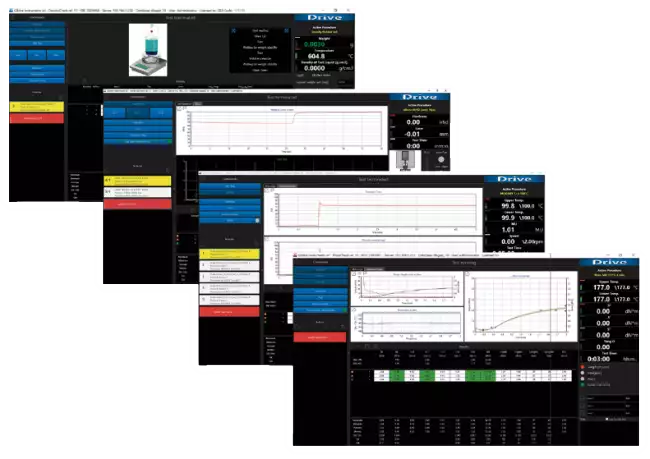
software datagest: Test Porcedures: total instrument control
Test Porcedures: total instrument control

Prepare your test Report 

You can use one of the available report formats, insert your logo, one or more graphs, tolerance limits, statistics, images, legend, notes, etc.

You can select the language you prefer and print the report or better produce it in PDF, Word or Excel format.

In addition, the software includes a Report Editor that allows you to:
• Create copies of the default report format
• Modify them to your liking
• Save new formats produced
• Select which format you want to use for printing.

Examples of test Reports
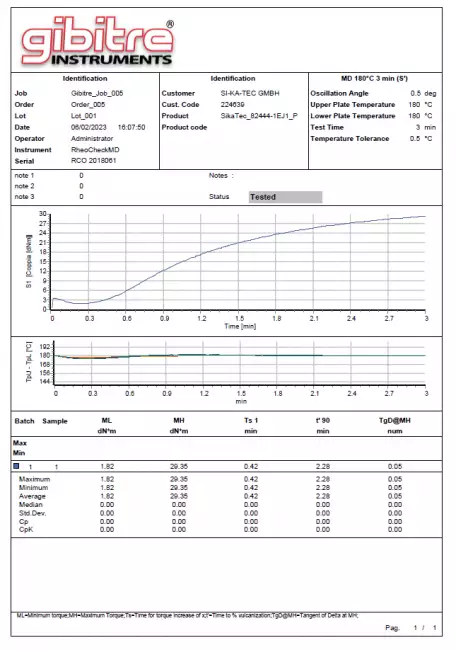
software datagest: Prepare your Customized Report Formats software datagest: Prepare your Customized Report Formats software datagest: Gibitre software in version 10. Test report with custom format with curves and results usable for all Gibitre instruments. software datagest: RheoCheck-MD_Drive. RheoCheck Sofware Version 10. Sample test report with custom format with curves and results.

Multi-Instrument Test Reports 

The program allows you to prepare customized reports to send the results of all tests carried out to your customers.
It's possible:
• Select Logo and Language
• Include Test Curves
• Include Tolerances and Statistics
• Include the scanned signature

Reports can be saved in Pdf or Word format (fully editable) or sent directly by e-mail
In the images some examples of reports included in the standard installation.

software datagest: Datagest program version 11. Page for selecting custom multi-instrument report format to be produced. software datagest: Datagest program version 11. Page for selecting custom multi-instrument report format to be produced. software datagest: Data collection software Datagest 11: Example of Multi-Instrument Test Report related to a selected group of tests. software datagest: Data collection software Datagest 11: Example of Multi-Instrument Test Report related to a selected group of tests.

Management of Users 

Datagest program manages the list of users and their access rights to all Gibitre programs.
For each user you can set:
• Username and Password
• Access Righets (administrator, Operator, User)
• Scanned Signature to be included in the test reports.

According to the access rights, the users can:
• Edit or Delete Test Results and approval status.
• Create, Edit, Remove Test Procedures
• Create, Edit, Remove Tolerance Limits
• Create, Edit, Remove Products, Customers, Orders
• Change Instrument Setups
• Edit Report Data

software datagest: Datagest program version 11. Page for setting credentials and access rights of users enabled to use Gibitre programs.
Datagest program version 11. Page for setting credentials and access rights of users enabled to use Gibitre programs.

Manual Entry of Test Results 

The Datagest program allows you to manually enter the test results obtained with instruments that are not connected or that do not produce digital results.
In this way you can:
- Complete the archiving of evidence
- Produce Multi-Instrument Test Reports that include all the work done.

software datagest: Manual Data Entry: complete your Dataset
Manual Data Entry: complete your Dataset

Export of Data 

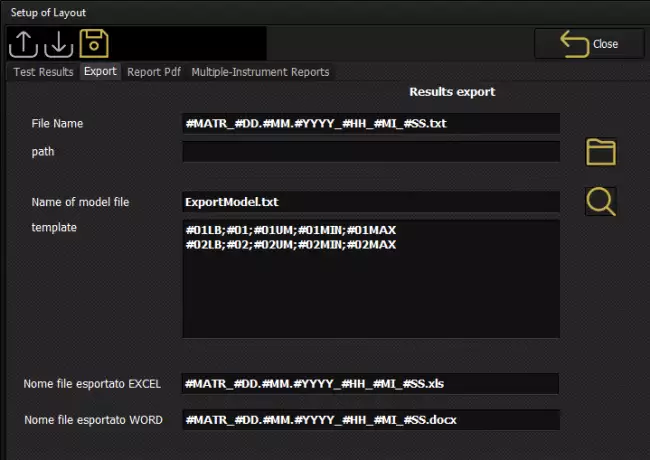
The program is equipped with various tools for data export:
• Export Selected Results to .csv file (Excel compatible)
• Export of curve points to .csv files
• SQL query for data export to other platforms
• Excel file with dynamic data connection to the test list

In addition, procedures are provided for data export with specified paths and methods.

software datagest: Datagest program version 11. Page for setting up export of results with custom format.
Datagest program version 11. Page for setting up export of results with custom format.

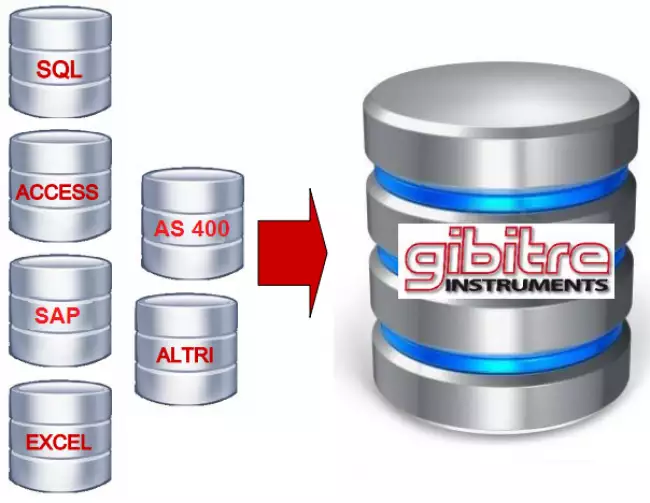
Synchronization of Data with Management Programs 

Normally, every company has a production control software where information about incoming materials, products, customers, and production orders are stored.
Normally the main control activity refers to incoming products or production control.
To have traceability of control activity the test results must be identified according to your identification system inserting information such as Product Code, Order, Lot Number, Customer Code (or Provider code), batch number, Operator, Date and time.
The syncronization of your company management sw and Gibitre database can be easily done using Gibitre - Company Connect program.

software datagest: Laboratory integration: a simple operation
Laboratory integration: a simple operation

Language Selection 

All the programs produced by Gibitre are multi-language and allow the operator to select the language of use.
The test report can be produced in the desired language regardless of the language of use of the program.
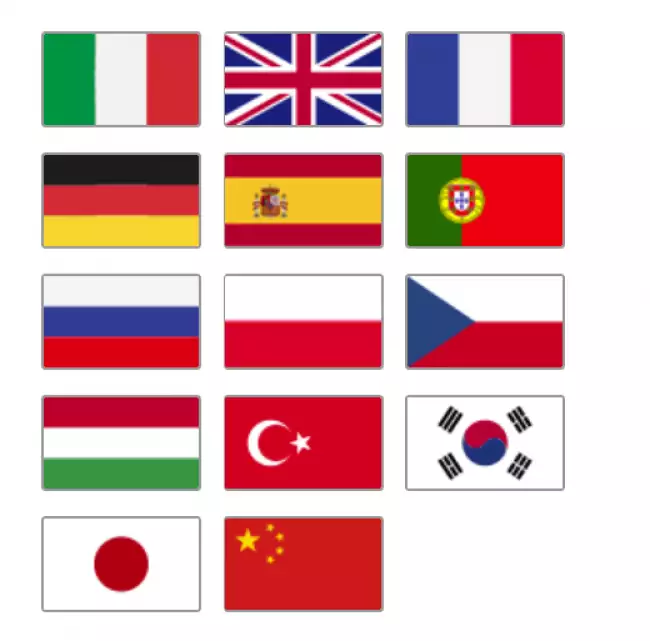
The languages available at the moment are: Italian, English, French, German, Spanish, Portuguese, Russian, Polish, Czech, Turkish, Japanese, Chinese.

software datagest: Choose your Language
Choose your Language
Download
Brief product leaflet
General catalogue mail request

Gibitre Software Platform
Vedi anche: One single Software for your Lab
See Also   >
Company Connection Software
Vedi anche: Integration between Management software and Laboratory
See Also   >
News
Call to action
Ask for quotation
a guided way to ask
for a quotation
Mail
info@gibitre.it
The good old e-mail
ready for every season
Phone
+39 035 460146
We welcome your calls Monday through Friday from 8:30 a.m. to 5:30 p.m. in your local time zone.
Newsletter
Subscribe
Stay updated
with the last news
of your sector
Local agent
from: -
See the whole list

In your country
in your language
at your service
Gibitre Instruments S.r.l., Via dell'industria 73, 24126 Bergamo Italia, pec@gibitre-instruments.it P. IVA: IT02827900164 CCIAA REA Bergamo: 326486 | ©2018 - 2026 Gibitre Instruments
Optimist.it
Welcome to the Gibitre Instruments web site
Please chose the preferred Cookie Management.
Benvenuti nel sito Gibitre Instruments
Per continuare scegliete la Gestione dei Cookie che preferite.
Cookies policy
For detailed informations about the use of cookies, please read our
Cookies Management Practice.

Gestione dei Cookies
Per maggiori informazioni sui cookie utilizzati consultate la nostra
Procedura sull'Uso dei Cookies.